Google Forms SMS: One Response, One Automatic Text Message
Google Forms SMS: One Response, One Automatic Text Message
You’re already using Google Forms for training registrations, school pre-registrations, event reservations, or quote requests. The responses are collected in a Google Sheets spreadsheet… but then what? Someone has to read them, call each person back, confirm the details, and remind them of the date. With the integration Google Forms SMS With Sakitoo SMS, every response automatically triggers an SMS: confirmation, practical information, or a reminder. You don’t have to do a thing.
Here’s how it works, what it’s actually used for, and what you’re missing out on by continuing to do it manually.
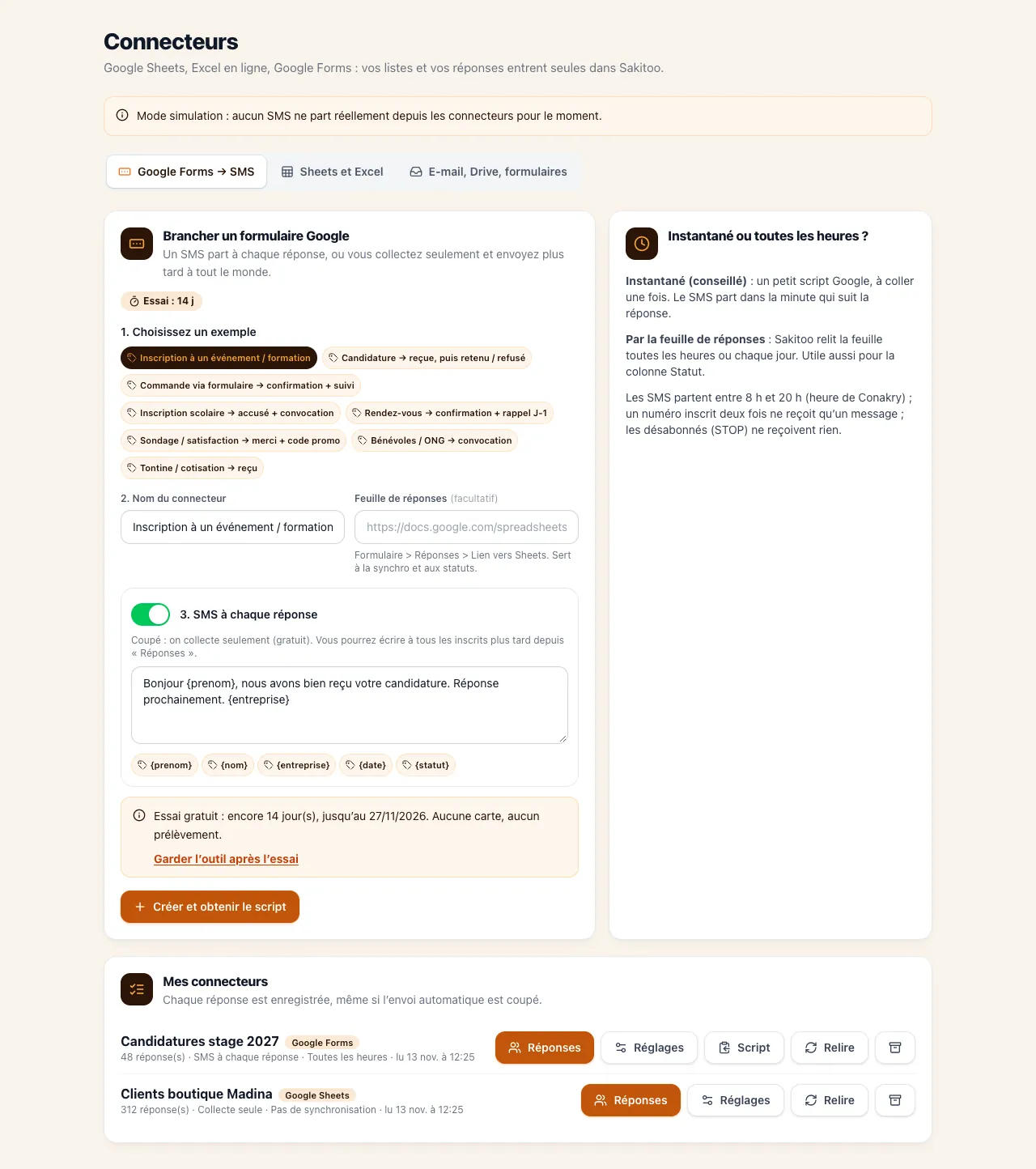
Table of Contents
- The problem with forms that aren't followed up on
- What the Google Forms → SMS integration does
- Use cases in Guinea
- Set up the connection in 5 steps
- How to Write a Good Confirmation Text Message
- Google Sheets on its own: when one row is enough
- Google Forms or the Sakitoo form?
- How much does it cost?
- Frequently Asked Questions
The problem with forms that aren't followed up on
Google Forms is free, easy to use, and well-known. That’s why so many schools, organizations, training centers, and small businesses in Guinea use it. But a form only collects data. Everything else has to be done manually.
The person doesn't know if their registration has been processed
After tapping “Send,” she sees a message on the screen, then nothing. Many call to check. Others sign up twice. Some give up, thinking it didn’t work.
Practical information is getting lost
Date, location, documents to bring, amount to pay: if the information isn’t sent in writing to the person’s phone, they’ll forget it. On the big day, you’ll find yourself answering the same questions ten times.
Your team spends its days making follow-up calls
Example: A training center in Kaloum receives 150 online registrations for a workshop. A staff member spends two days calling each registrant to confirm. Some do not answer. On the day of the workshop, some of the registrants do not show up, and the room is half-empty even though the waiting list was full.
Emails aren't enough
Google Forms can send a confirmation email, but this requires that the person has provided an email address, checks their inbox, and that the message doesn’t end up in the spam folder. In Guinea, text messages remain the most reliable way to ensure a message is read.
What the Google Forms → SMS integration does
Essentially, Sakitoo SMS “monitors” your form or spreadsheet. As soon as a new response comes in:
- The phone number is displayed in the column you selected;
- It is converted to the correct Guinean format if necessary;
- An SMS is sent with the message you have prepared, addressed to the recipient’s first name if your form requests it;
- You can add the contact to your list, with a label (“November Workshop,” “6th Grade Pre-Registration,” etc.), for your future messages;
- The message will appear in your reports.
The text message is signed by your Sender's name and reaches all networks in Guinea: Orange, MTN, and Cellcom.
What You Get
- No more missed replies : Every subscriber receives a confirmation, even on a Sunday evening.
- Fewer incoming calls : The information is already on his phone.
- A clean list : Your subscribers are organized and ready for the reminder sent the day before.
- Time : Your team can focus on customer service and content, not on confirmations.
Use cases in Guinea
The scenarios below are examples to help you envision how you might use the service.
School Pre-Registration
Example: A school in Kipé opens online pre-registration via Google Forms. Each parent immediately receives:
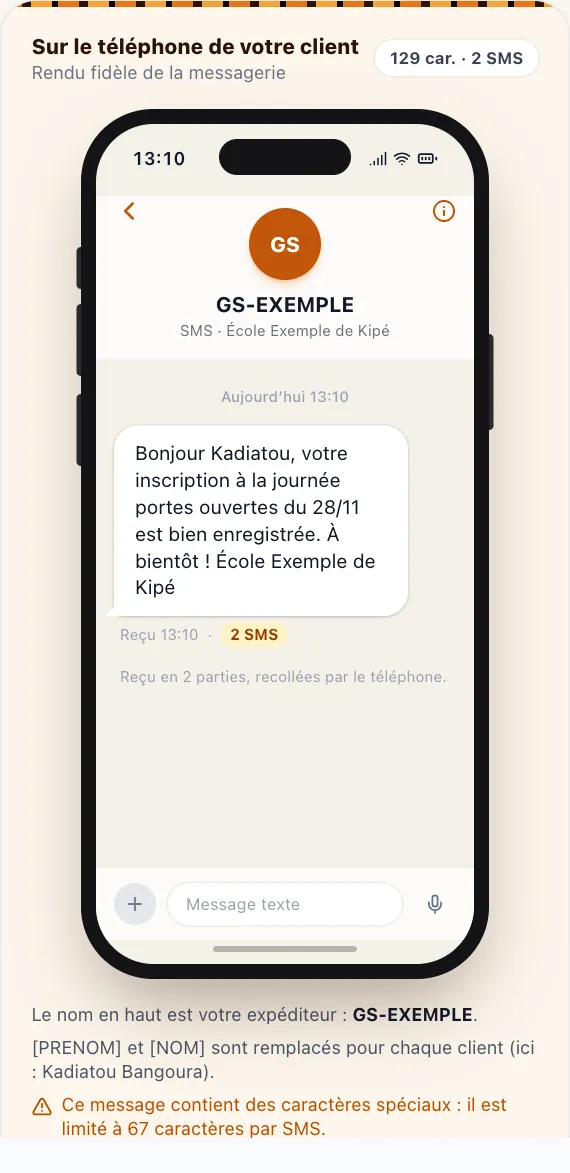
Hello Mr. Barry, we have received Fatou’s pre-registration for 6th grade. Please come on the 20th at 9 a.m. with her birth certificate and report card. Horizon School.
Parents are then added to a “6th Grade Pre-Registered” list to receive results notifications. To learn more about the schools, read SMS for schools in Guinea.
Training and workshops
Example: An NGO in Kindia is organizing a training session for agricultural groups. A confirmation message is sent upon registration, followed by a scheduled reminder the night before, including the exact location.
Events, conferences, weddings
Whether it’s registering for an association’s gala, reserving a spot at a concert, or compiling a guest list for a baptism, the SMS confirmation also serves as a “ticket” that the person shows at the entrance.
Requests for quotes and appointments
Example: A carpenter in Coyah receives quote requests via a form shared on Facebook. Each requester receives: “Thank you, we’ll get back to you within 48 hours.” " The customer knows their request has been received. For clinics and medical practices, the Agenda tool goes a step further with appointment scheduling and reminders: see Clinic appointment reminders.
Surveys and data collection
After a field survey, a thank-you text message to participants builds trust for future data collection efforts.
Careers
Candidates who fill out the form will receive a confirmation, followed by an invitation via text message if they are selected.
Set up the connection in 5 steps
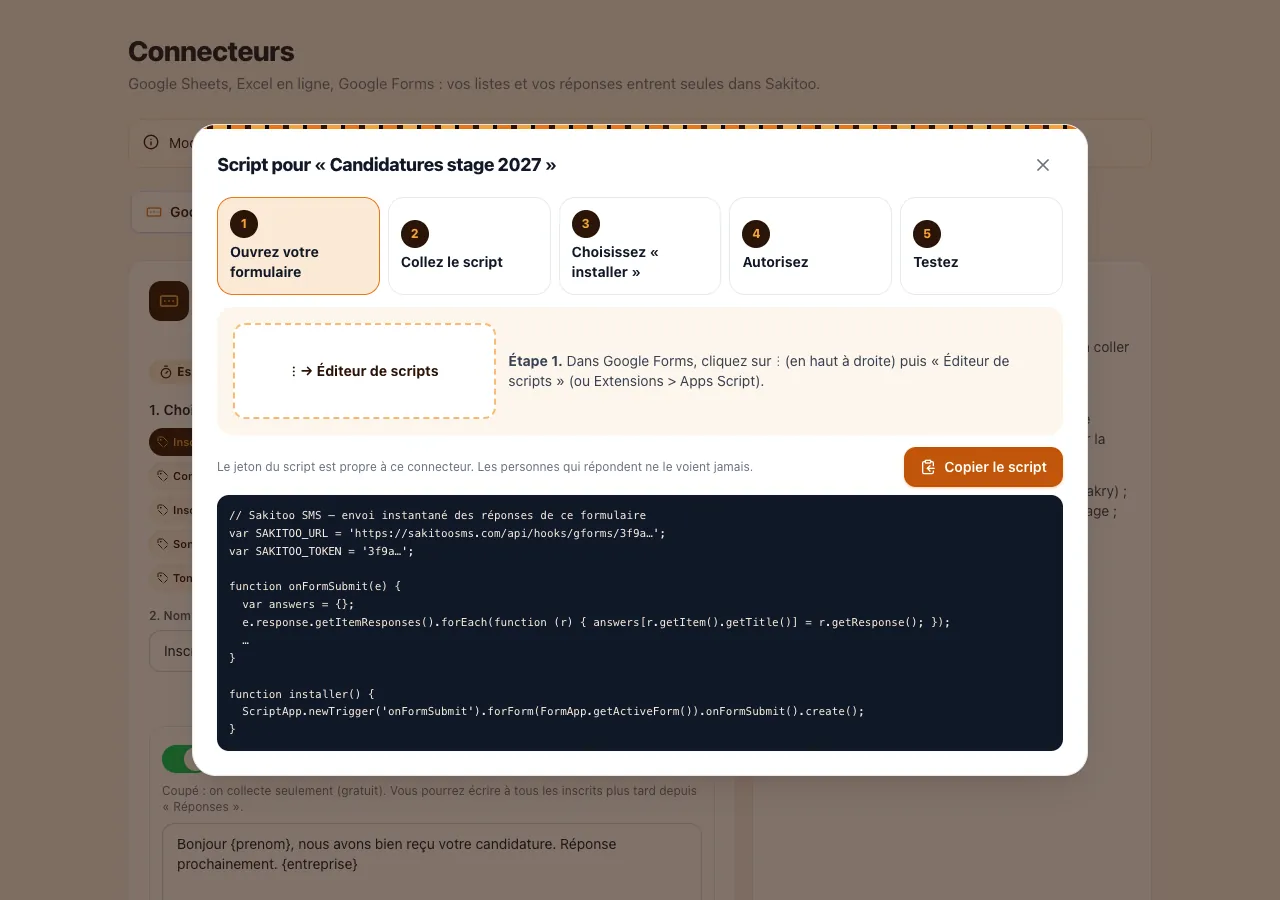
1. Add a “Phone” question to your form
That is the only requirement. If possible, include a “First Name” field to personalize the message. In the instructions, specify the expected format, for example, “Guinean number, e.g., 622 00 00 00.”
2. Connect your Google account through Sakitoo SMS
In your account, open the Google Forms/Sheets link and grant access to the relevant form or spreadsheet. You choose exactly which file to link: Sakitoo SMS will only read that one.
3. Specify the columns
Please specify which column contains the phone number, which one contains the first name, and any other information to include in the message (class, selected date, plan, etc.).
4. Write the message
Compose your text message using variables (first name, etc.). A preview shows you the result and the number of text messages the message will generate.
5. Test it with your own number
Fill out the form yourself. You should receive the text message within a few moments. Then, share the form as usual: everything happens automatically.
How to Write a Good Confirmation Text Message
What it should include
- Confirmation : “Your registration has been received.”
- Purpose : what the person signed up for.
- Useful Information : date, time, location, documents, amount.
- Contact Information : For questions.
- The signature : Your sender name is often all that's needed.
What to Avoid
- If a message is too long: an SMS that exceeds the character limit counts as multiple SMS messages, and accents or emojis take up space.
- Unintelligible abbreviations.
- A link with no explanation.
Sample messages
The following examples are fictional.
Hello Mariama, your spot in the sewing workshop on November 28 is confirmed. 9 a.m., Dixinn Youth Center. For more information: 622 00 00 00.
Thank you, Alpha! We’ve received your quote request. We’ll call you within 48 hours. Coyah Bois Carpentry.
Hello Ms. Sylla, we have received your registration for the open house on December 6. Please bring your child at 10 a.m. to Lycée Excellence.
Plan for the future
The confirmation message is just the first one. Since your subscribers are organized by label, you can schedule:
- a reminder the day before;
- a same-day message in case of a change;
- a thank-you message after the event;
- Announcement of the upcoming session.
Google Sheets on its own: when one row is enough
Don’t use a form, but instead rely on a Google Sheets spreadsheet filled out by your team (orders, deliveries, files)? That works too: each new row containing a number can trigger an SMS.
Example: A store in Madina records its WhatsApp orders in a shared spreadsheet. When the sales clerk adds a line, the customer receives: “Your order #152 has been recorded. Delivery tomorrow.” The customer is reassured, and the sales clerk has nothing else to do.
For online stores built on Shopify, WooCommerce, or Odoo, dedicated integrations are available: see the page Integrations. For developers who want to integrate their own software, read Integrating an SMS API in Guinea.
Google Forms or the Sakitoo form?
Sakitoo SMS also offers its own web forms. Which one should you choose?
| Criterion | Linked Google Forms | Sakitoo SMS Form |
|---|---|---|
| You already have a form set up | Ideal | It needs to be redesigned. |
| Google account required | Yes | No |
| Contact added directly to your lists | Yes | Yes |
| Automatic confirmation SMS | Yes | Yes |
| Share via link or QR code | Yes | Yes |
| Questions and Advanced Formatting | Very comprehensive | Essentials |
In short: if you already have a Google Form that’s up and running, link to it. If you’re starting from scratch and want to keep it simple, create a form directly on Sakitoo SMS: see the page Forms.
Data Usage Guidelines
The collected phone numbers must be used only for the purpose for which the person provided them. Indicate on your form that you will send a confirmation and information via text message. Anyone who no longer wishes to receive your messages will be removed from your mailing list.
How much does it cost?
Prices verified on 11/13/2026, see /pricing.
Each confirmation SMS is deducted from your balance. The form itself doesn't cost anything extra on Google's end.
| Package | SMS | Prices | Price per SMS |
|---|---|---|---|
| Explore | 50 | 12,500 GNF | 250 GNF |
| Starter | 200 | 42,000 GNF | 210 GNF |
| Pro | 1 000 | 205,000 GNF | 205 GNF |
| Business | 5 000 | 1,025,000 GNF | 205 GNF |
| Business | 20 000 | based on a quote | based on a quote |
SMS messages do not expire. The sender's name is included free of charge starting with the Pro package (1,000 SMS messages).
A quote for a workshop
Example: 150 registrants, one confirmation message, and one reminder the day before—for a total of 300 text messages. With the Pro plan, this comes to 61,500 GNF. Compare that to two days of one person’s work on the phone, and to the cost of a half-empty room.
Common Mistakes and How to Avoid Them
Optional phone number
If the question isn’t required, some respondents will skip it and receive nothing. Make it required and explain why: “to receive your confirmation via text message.”
A misused free-text field
Some people write “my number is 622…” or include two numbers separated by a slash. Clearly specify the expected format and allow only one number per response. The Number cleansing Helps you edit an existing list.
Modify the columns after linking
If you rename or move the “Phone” field in your form, check the link afterward and retest it with your number.
Skip the test after editing the message
After each text change, fill out the form yourself once. You’ll see the message exactly as your subscribers receive it.
Leave the form open indefinitely
A comprehensive training course that continues to accept registrations is causing disappointment. Close the registration form, or change the confirmation message to announce a waiting list.
Frequently Asked Questions
Do you need to know how to code? No, the setup process consists of just a few guided steps.
Is the text message sent immediately? Yes, for each new reply.
What about using just Google Sheets? A new line containing a number can trigger the message to be sent.
How much does a confirmation cost? One text message from your plan, for example, 205 GNF with the Pro plan.
What about incorrectly entered numbers? Messages are formatted correctly whenever possible; invalid numbers are not sent.
A solution without Google? Yes, Sakitoo SMS's web forms.
Connect your form today
A form without confirmation leads to hesitant registrants, calls that flood your phone, and empty seats on the big day. With the Google Forms → SMS integration, each response receives an instant confirmation addressed by first name and signed by your organization.
Create your account for free, link your form and test it with your own number. To explore other automated scenarios, visit the Automations page.
Frequently Asked Questions
Do you need to know how to code to connect Google Forms to text messages?
No. You send messages from your Sakitoo SMS account by following the steps displayed: select the form or sheet, the phone number column, and then the message.
Is the text message sent immediately after a reply is received?
Yes, each new response triggers the sending of the specified text message, addressed to the person’s first name if your form requests it.
What if I use Google Sheets without a form?
Adding a new line to the spreadsheet can also trigger a message to be sent, provided that the line contains a phone number.
How much does each confirmation cost?
One SMS from your plan, for example, 205 GNF with the Pro plan (1,000 SMS for 205,000 GNF). Prices verified on 11/13/2026; see /pricing.
Do incorrectly entered numbers cause problems?
Guinean phone numbers are formatted correctly whenever possible; any that remain invalid will not be sent, so as not to waste your credit.
Is there a solution that doesn't use Google?
Yes, Sakitoo SMS web forms: you create the form directly on the platform, and each response adds the contact and can trigger an SMS.