Guinea SMS API: Send messages from your software
Guinea SMS API: Let your software notify your customers for you
Your website processes an order, your point-of-sale software authorizes a payment, your app creates an account… and then what? If no one notifies the customer, they’ll call, they’ll worry, or they’ll give up. A Guinea SMS API It allows your own system to send the right message at the right time, without human intervention, to all networks in Guinea: Orange, MTN, and Cellcom. This article is intended for executives and technical managers who want to understand what an API offers, how to choose one, and how much it costs—all without unnecessary jargon.
In pictures
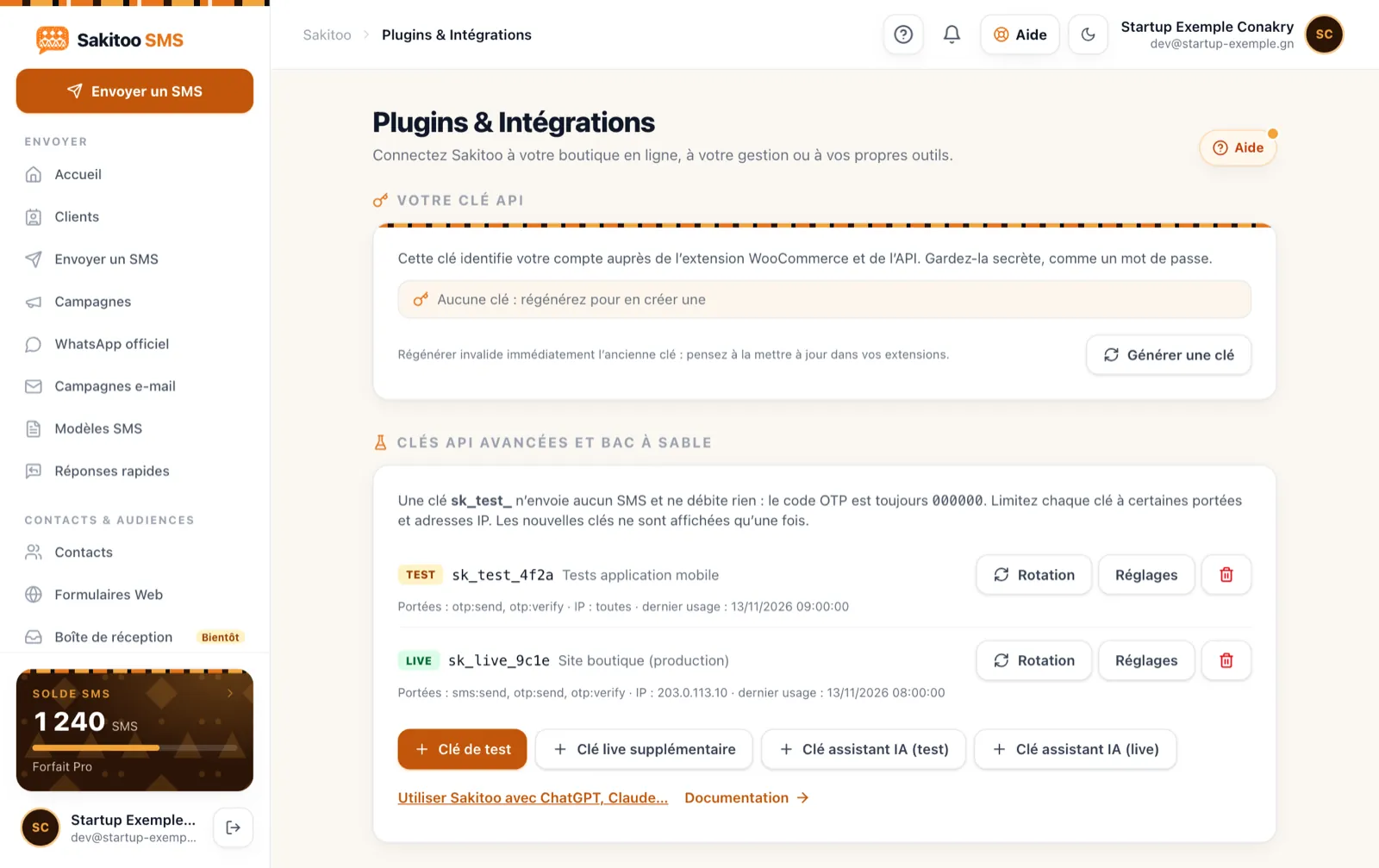
Table of Contents
- What an SMS API changes, in one sentence
- What You Lose by Sending Messages Manually
- Messages to Automate First
- API, ready-to-use integration, or form: which should you choose?
- How does the sign-up process work?
- Reliability and Security: Questions to Ask
- Important Limits to Know
- Examples by Industry
- How much does it cost?
- FAQ and documentation
What an SMS API changes, in one sentence
An API (application programming interface) is a gateway that allows your software to tell Sakitoo SMS, “Send this message to this number.” Your tool decides when and What ; Sakitoo SMS handles routing to the recipient’s network, sender name, and delivery tracking.
In practice: the order confirmation is sent the moment the order is confirmed—even at 11 p.m., even on a holiday, even when the entire team is in a meeting.
What You Lose by Sending Messages Manually
Many Guinean businesses still send their confirmations manually, using a work phone. It works… until the volume increases.
- Omissions. The seller forgot to confirm delivery; the customer waited all day.
- Delivery times. The verification code arrives ten minutes too late; the user has already closed the app.
- Errors. A miscopied amount, a wrong first name, a message sent to the wrong customer.
- A personal phone number is displayed. Customers call the seller's phone at all hours.
- No results found. It is impossible to prove that a customer was actually notified.
An API eliminates these risks for all repetitive messages and frees up your team to focus on what truly requires human intervention.
Messages to Automate First
Start with the messages that are sent frequently and whose content always follows the same format:
| Event in your tool | SMS sent |
|---|---|
| Order confirmed | “Your order no. … has been confirmed; delivery is scheduled for …” |
| Package shipped or in transit | “Your package is on its way; the delivery person will call you.” |
| Payment received | “Payment of … GNF received, thank you” |
| Create an account or log in | One-time verification code |
| Scheduled appointment | Confirmation, followed by a reminder the day before |
| Credit or invoice due date | Reminder a few days in advance |
| Internal Alert | “Low stock on item …,” “Large payment received” |
For verification codes, there is a dedicated OTP feature; it is described in OTP codes via SMS in Guinea.
API, ready-to-use integration, or form: which should you choose?
An API isn't always the right solution. Sakitoo SMS offers several integration options, depending on the tools you use:
| Your situation | The simplest solution |
|---|---|
| Online store on Shopify, WooCommerce, or managed via Odoo | The Ready-to-use integrations : Get connected without writing any code |
| Sign up via Google Forms or a Google Sheets spreadsheet | The Google Forms/Sheets → SMS link (see Google Forms SMS) |
| Need a simple registration form? | The web forms Sakitoo |
| Scheduled messages based on specific dates (birthdays, due dates) | The automations |
| In-house software, mobile app, custom website | The API |
| AI assistant capable of sending text messages | The Sakitoo SMS MCP server |
If your need matches one of the first few lines, start there: it’s faster and less expensive than custom development.
How does the sign-up process work?
For a business owner, here are the steps to follow, without getting into the technical details:
- Create an account About the company at Sakitoo SMS and request the Sender's name (for example, “KIPE-MARKET”). See The SMS sender's name.
- Create an API key from the account. It’s the equivalent of a password for your software: it’s kept secret on the server side, never displayed on a visible web page or in an application installed on customers’ devices.
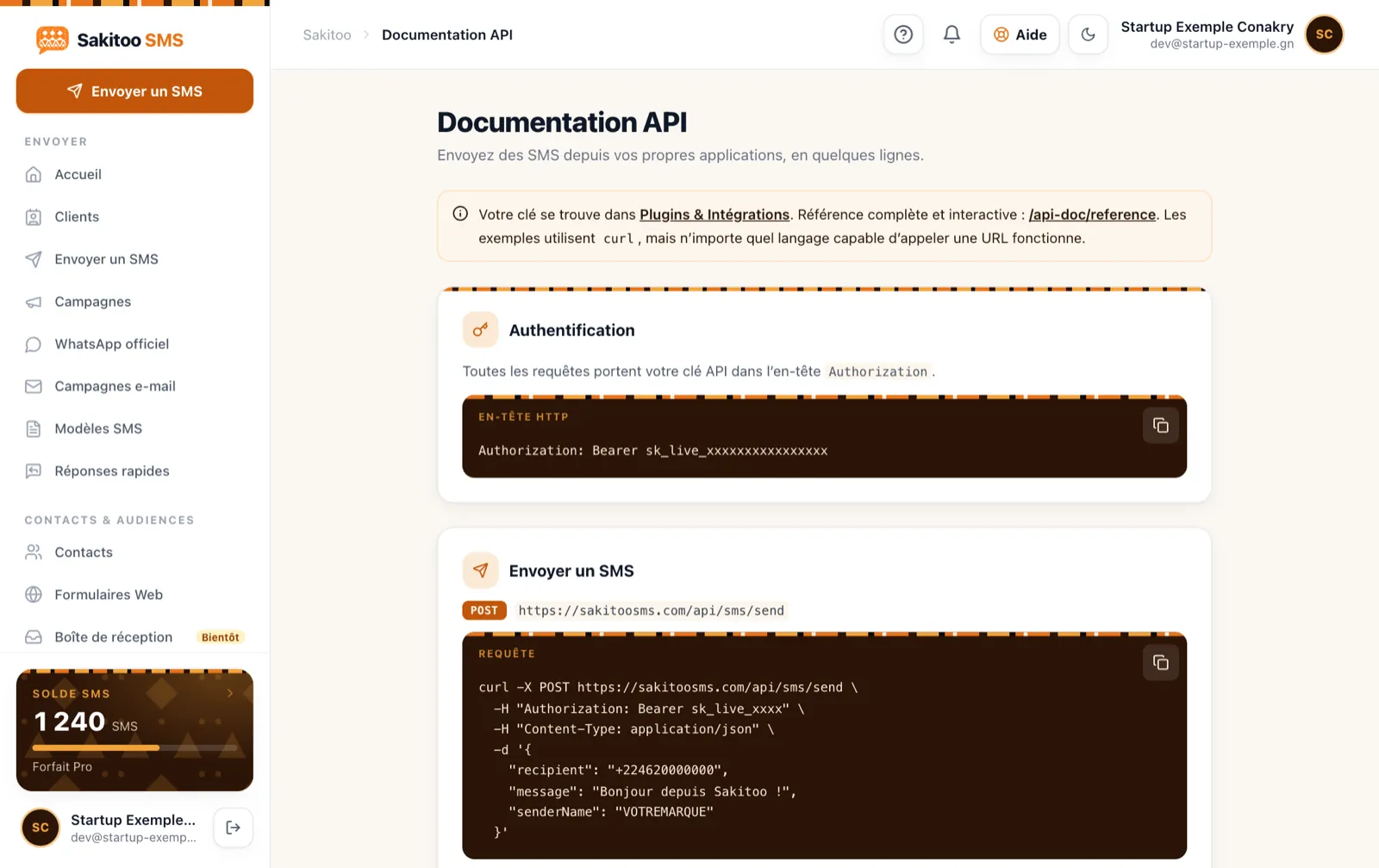
- Submit the documentation from the page /developers to your developer. It contains ready-to-use examples in several programming languages.
- Test it with your own numbers Before opening the service to customers: check the text, length, and name display.
- Get started and monitor the first few days in the reports.
For a well-organized website or software application, a developer familiar with APIs can usually set up the basic integration quickly. The actual time required depends mainly on your existing system; ask the developer for an estimate after reviewing the documentation.
Write message templates
This is often the step people overlook. Draft each message template in advance, including variable fields (first name, order number, amount, date), and have them approved by the sales team. A clear, concise message prevents calls like, “I didn’t understand your text.”
Reliability and Security: Questions to Ask
Whether you choose Sakitoo SMS or another solution, ask these questions before committing:
- Which networks are supported? With Sakitoo SMS: all networks in Guinea: Orange, MTN, and Cellcom.
- Do I have a delivery status for each message? Yes, thanks to delivery receipts, which are visible in the reports.
- What happens if my balance is zero? Set up an alert: Sakitoo SMS sends a low-balance reminder, and automatic top-up is available with the Pro Pass.
- Is my data protected? Your customers’ phone numbers remain in your account, kept separate, used solely for your messages, and never resold.
- Is the price the same for all networks? Yes.
- Who can help me if I have a problem? Support is available via WhatsApp and through the account; priority support is included with the Pro Pass.
Best Practices for Businesses
- One key per app, so you can disable one without affecting the others.
- Never share the key via text message or email in plain text.
- Reissue the key if a service provider leaves the project.
- Send only useful messages: a customer who receives too many automated text messages will eventually ignore them.
Important Limits to Know
To protect the platform and your recipients, the API enforces limits per account:
- 60 requests per minute ;
- 5,000 requests per day.
For most businesses, schools, and clinics, these limits are more than sufficient for transactional messages. For a campaign sent all at once to thousands of contacts, use the bulk messaging feature from your account instead (see Bulk SMS messaging in Guinea). If your daily volume exceeds these limits, please contact us to discuss this before launch.
Another point: a long message counts as multiple SMS messages. If your confirmations contain a lot of information, shorten them or add a link to the full details.
How to Write Effective Automated Messages
An SMS sent via software must be just as carefully crafted as one written by hand—if not more so—since it’s sent hundreds of times.
Log in now. Even if you include a sender name, be sure to mention the company name at the beginning of the text. Some phones only display the beginning of the message in the notification.
Please provide the relevant reference. Order number, date, amount: this is what the customer will be looking for if they call you. Avoid using internal references that are hard to understand.
Just one step. “Reply to the delivery person,” “Show this text message when picking up your order,” “Log in with this code.” Not all three instructions at once.
No sensitive data. Never include a password, credit card number, or medical information in a text message. People lend their phones to others and look at them.
Plan for potential errors. What does the customer receive if the delivery is canceled? What if the payment fails? Be sure to draft these messages as well; otherwise, your software will send a confusing message—or nothing at all.
Count the characters. Accents and certain special characters reduce the available space in an SMS. Test your templates with the longest possible values (long names, seven-digit amounts) to ensure they fit within a single SMS.
Track and improve
Once the service is up and running, Sakitoo SMS reports display all messages sent via the API, along with their delivery status. Get into the habit of checking them weekly at first:
- Numbers that consistently fail to deliver often indicate a data entry error in your own customer database;
- An unexpectedly high volume may indicate that a message was sent twice by mistake;
- The number of SMS characters per message tells you if a template is too long.
These checks take just a few minutes and help you avoid paying for unnecessary messages.
What if you don't have a developer?
If you don’t have a developer on hand, you’re not stuck. There are three options:
- Ready-to-use integrations For Shopify, WooCommerce, and Odoo, which send order SMS messages without a code;
- the Google Forms or Sheets link, which converts a new reply or a new line into an SMS;
- the MCP server, which allows a compatible AI assistant to send text messages from your account at your request.
You can start with one of these options and switch to the API later, when your needs become more specific. SMS messages, the sender's name, and reports remain the same.
Examples by Industry
These examples are typical scenarios, not customer testimonials.
Example: an online cosmetics store in Conakry. Order confirmed → confirmation text message; package handed over to the delivery driver → “on the way” text message. Calls asking “Where’s my order?” are decreasing, and the team can focus on answering the real questions.
Example: a microfinance institution in Kankan. Its management software tracks due dates. Three days in advance, a reminder text message is automatically sent with the amount. See SMS for microfinance and tontines.
Example: a meal delivery app in Kipé. Verification code upon registration, followed by an SMS when the order leaves the restaurant.
Example: a travel agency in Kaloum. Reservation confirmation, reminder the day before departure, last-minute schedule changes.
Example: a building materials distributor in Kindia. Internal alert sent to the manager when a large payment is received or when inventory falls below a certain threshold.
How much does it cost?
Access to the API does not require a separate subscription: you pay for the SMS messages you send at the rate of the package you purchased. Prices verified on 11/13/2026, see Rates.
| Package | SMS | Prices | Via SMS |
|---|---|---|---|
| Explore | 50 | 12,500 GNF | 250 GNF |
| Starter | 200 | 42,000 GNF | 210 GNF |
| Pro | 1 000 | 205,000 GNF | 205 GNF |
| Business | 5 000 | 1,025,000 GNF | 205 GNF |
| Business | 20 000 | based on a quote | based on a quote |
SMS messages do not expire. The sender’s name is included free of charge starting with the Pro plan (1,000 SMS). When you purchase 1,000 SMS messages within a 30-day period, the Pro Pass also unlocks automatic top-ups and priority support, which are useful when critical messages are sent via the API.
Example: A store that sends two text messages per order (confirmation + shipping) for 400 orders per month uses 800 text messages, or 164,000 GNF at the Pro plan rate. For comparison, read How much does an SMS cost in Guinea?.
Switch to automatic mode
Every missed confirmation, every code that arrives too late—it’s one more customer who starts to have doubts. With the Sakitoo SMS API, your software notifies your customers instantly, on behalf of your company, across all networks.
- Create your account and request your sender name.
- Open the page Developers and create your key.
- Share the documentation with your developer, or get started with a ready-to-use integration.
The best message is the one that no one had to send by hand.
Frequently Asked Questions
Do you need to be a developer to use the API?
You’ll need someone who can make changes to your website or software. If you use Shopify, WooCommerce, or Odoo, ready-made integrations eliminate the need to write code.
Does the API send messages to all carriers?
Yes, to all networks in Guinea: Orange, MTN, and Cellcom, at the same price per text message.
Are there any limits on the number of messages that can be sent?
Yes, to protect the platform: 60 requests per minute and 5,000 per day per account. Contact us if your volume exceeds these limits.
How much does the API cost?
Access is included; you pay for the SMS messages you send at the rate specified in your plan (from 250 to 205 GNF per SMS depending on the plan; prices verified on November 13, 2026).
Can I send verification codes?
Yes, the API offers a dedicated OTP feature: a 6-digit code, valid for 5 minutes, with a maximum of 5 attempts.
Where can I find the documentation?
On the /developers page, with examples in several programming languages.