Clinic SMS appointment reminders: a busy schedule
Clinic SMS appointment reminders: Fill up your schedule, not your empty waiting rooms
A patient who forgets an appointment means a lost slot, a doctor waiting, and another patient who could have been seen. Whether at a clinic in Kaloum or a practice in Nzérékoré, these missed appointments happen every week. The Clinic SMS appointment reminders It solves the problem at the source: the day before, each patient receives a text message on behalf of your facility, including the date, time, and location. Here’s how it works with Sakitoo SMS, what you gain, and what it costs.
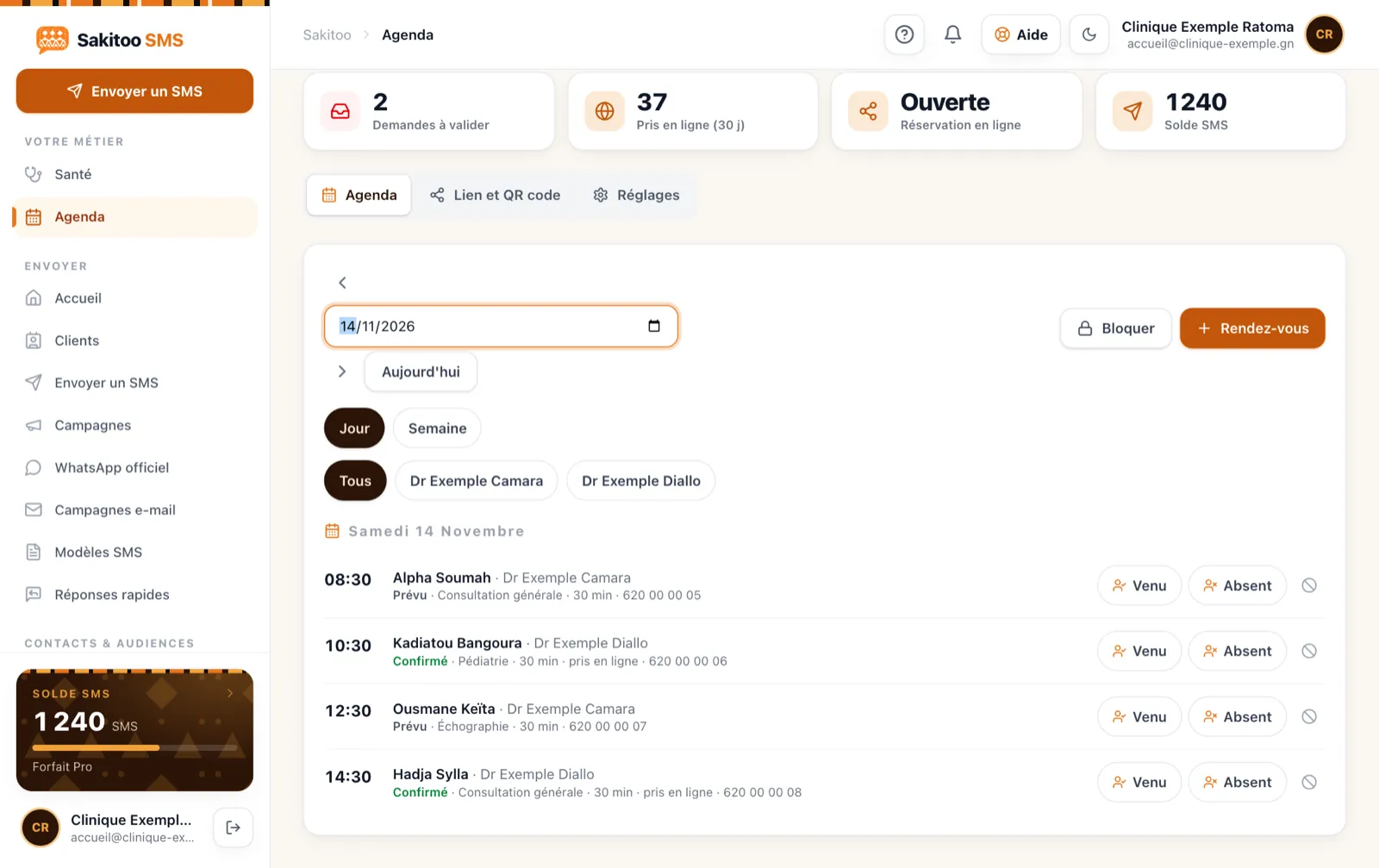
Table of Contents
- The True Cost of a Missed Appointment
- Why Patients Forget
- How the automatic callback works
- Sample messages
- Privacy: What a reminder message should never say
- Online appointment scheduling
- Prescriptions to be renewed and follow-ups
- Examples by healthcare facility
- How much does it cost?
- FAQ and trial
The True Cost of a Missed Appointment
A gap in the books may not be visible, but it comes at a cost:
- A free consultation, even though the doctor, the room, and the team were available.
- A patient on the waiting list who could have taken that spot, and perhaps elsewhere as well.
- Tracking interrupted : Patients who miss their follow-up appointments return later, sometimes with a more serious problem.
- Secretarial services Forgot to call back, reschedule, or apologize to the doctor.
Calling each patient the day before solves part of the problem, but no one has two hours a day to do that. Text messages handle this task automatically.
Why Patients Forget
Rarely due to negligence. Most often:
- The appointment was made two or three weeks earlier;
- The paper handed in at the counter was lost;
- the date falls on a market day, a holiday, or a travel day;
- The patient got the time or the location wrong, since the clinic has several locations.
A message received the day before addresses all four of these points at once: it reminds the patient of the date, the time, and the location, and gives them time to let the clinic know if they can’t make it.
How the automatic callback works
With the Health + Calendar plan (page /health) :
- You schedule the appointment In the calendar: patient, number, date, time, practitioner.
- The reminder is scheduled automatically for monitoring.
- The patient receives the text message On behalf of your clinic, across all networks in Guinea: Orange, MTN, and Cellcom.
- Track your delivery in the reports. If a number fails, the office staff sees it and can call back.
You don’t have to send anything manually. The only thing you need to do is enter the correct number when scheduling the appointment—which the administrative staff already does.
The Right Move at the Counter
Ask the patient to repeat their number, or have them call the clinic’s phone. One wrong digit means a missed callback. Also note a second number (a family member’s) for elderly patients or children.
Sample messages
The templates below use fields that are automatically filled in.
Standard reminder
CLINIQUE-ESPOIR: Reminder of your appointment tomorrow [Date] at [Time] with [Practitioner]. Please arrive 15 minutes early. If you can’t make it, call 6XX XX XX XX.
Reminder with practical tips
CLINIQUE-ESPOIR: Appointment tomorrow at [Time]. Please come on an empty stomach and bring your previous test results. Info: 6XX XX XX XX.
The instruction “on an empty stomach” does not provide specific medical information; it is a practical guideline. Keep it at that level.
Reminder for a child
CLINIQUE-ESPOIR: Reminder of [First Name]’s appointment tomorrow at [Time] in the pediatrics department. Please bring the health record.
Appointment Confirmation
CLINIQUE-ESPOIR: Your appointment is scheduled for [Date] at [Time]. You will receive a reminder the day before.
This first message reassures the patient and, at the same time, verifies that the number is correct.
Privacy: What a reminder message should never say
A phone is something you lend to others, look over someone’s shoulder at, and share with family. A health-related text message must therefore remain neutral:
- Never the reason ("gynecological consultation," "HIV follow-up," "test results").
- No results found analysis or diagnosis.
- No outstanding balances associated with a specific medical procedure.
- The organization’s name, date, time, location, and a contact number : That's enough.
For a maternity ward, a specialized department, or a screening center, choose a general sender name (“CLINIQUE-ESPOIR”) rather than the name of the specific department. Your patient data remains secure within your account, is used only for your messages, and is never sold to third parties.
Online appointment scheduling
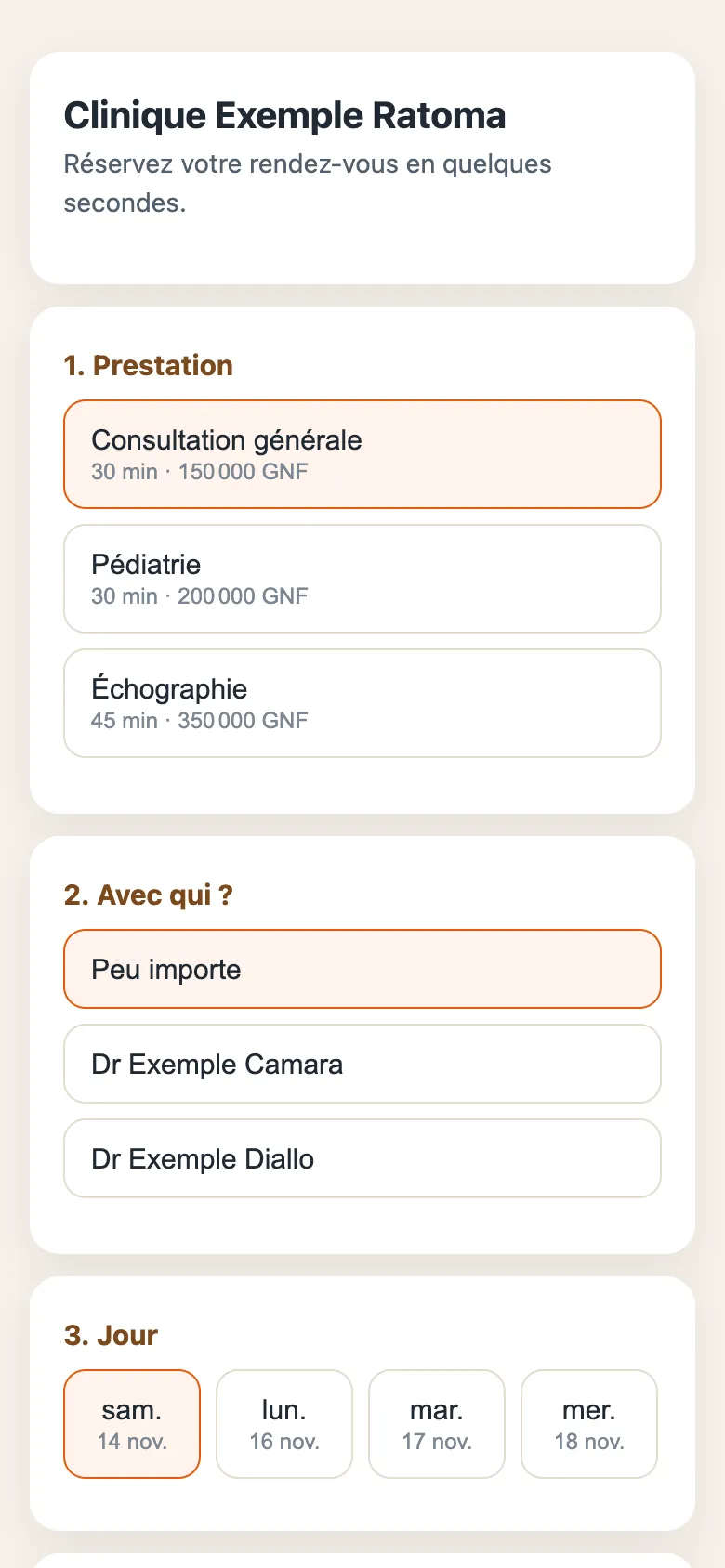
The Health + Calendar package includes an online appointment booking page. You can share it on your Facebook page, in your messaging status, or on a sign at the counter.
What you get:
- requests that come in even when the switchboard is closed;
- fewer calls during peak hours;
- Appointments are entered along with the patient’s phone number, so patients are automatically called back.
What you're missing out on without it: Any patient who can't reach you by phone should call the next clinic.
Prescriptions to be renewed and follow-ups
In addition to appointment reminders, the plan includes follow-up reminders:
- Prescriptions to be renewed : Patients undergoing long-term treatment receive a reminder before their prescription runs out to schedule a follow-up appointment.
- Periodic checks : Prenatal care, vaccinations, annual checkups. You enter the date of the next appointment, and the message is sent when the time comes.
- General Announcements : schedule changes, new doctor, free screening day organized by the clinic.
For pharmacies, which have their own specific needs (incoming orders, on-call duty), see SMS for pharmacies.
Organizing the administrative office around follow-ups
Automatic reminders are only fully effective if the reception team changes two or three habits.
In the morning: review the previous day’s failures
Every morning, the first thing we do is open the reports and identify the reminders that weren’t delivered. These are often the same issues: phone turned off, number written down incorrectly, or line suspended. A quick call to just those patients completes the job the text message started, instead of calling everyone.
When scheduling an appointment: verify the number
The callback is only valid for the number entered. Have the patient repeat the number, or send the confirmation immediately: if the patient receives it in your presence, the number is correct.
In case of cancellation: free up the time slot
When a patient uses the reminder to let you know they won’t be coming, the appointment slot becomes available the day before. Keep a short list of patients who are willing to come in earlier (for checkups or prescription refills) and offer them the slot. This is where the reminder system pays off the most: a slot canceled in time can be reassigned; a forgotten slot never can.
For doctors: a reliable schedule
A healthcare provider who knows that patients have been reminded of their appointments can organize their day and plan their breaks and on-call shifts. This reduces the domino effect of delays caused by patients arriving at the wrong time.
Common Mistakes with SMS Reminders
- Send too early. A reminder sent a week in advance is forgotten just as quickly as the appointment itself. The day before is the right time, possibly supplemented by a confirmation on the day the appointment is made.
- Sending too late at night. A text message at 10 p.m. can be disruptive and cause concern. Automated scheduling helps avoid this pitfall.
- Messages that are too long. Full address, instructions, hours, phone number: messages longer than one SMS will cost double. Stick to the essentials; detailed instructions are provided at the counter.
- One name for everything. If multiple sites share the same sender name, specify the site in the text (“Kipé site,” “Kaloum site”).
- Forget about the accompanying persons. For an elderly patient or a child, the reminder should be sent to the phone number of the person accompanying them.
What Trust Means
A patient who receives a personalized reminder signed by the clinic understands that they are expected and that arrangements are being made for them. This level of care is evident, especially in a sector where patients evaluate the reception just as much as the medical care itself. A reminder isn’t just a scheduling tool—it’s part of the quality of service you provide.
Examples by healthcare facility
These examples are typical scenarios, not customer testimonials.
Example: a dental office in Kipé. One practitioner, treatment spread over several sessions. Every missed session disrupts the entire treatment plan. Reminders sent the day before and confirmation when the appointment is made are enough to keep the schedule up to date.
Example: a multidisciplinary clinic in Kaloum. Multiple practitioners and multiple rooms. The reminder lists the practitioner’s name and the service, which prevents patients from getting lost in the hallways.
Example: a testing laboratory in Matam. Patients are reminded the day before about morning fasting blood tests, along with instructions. The message “Your results are available” is sent without ever providing the actual result.
Example: a health center in Kindia. Prenatal care and childhood vaccination schedule: dates are known in advance, and reminders are scheduled starting with the first visit.
Example: a physical therapist in Lambanyi. Repeated sessions over several weeks. A confirmation of the full series, followed by a reminder before each session.
Get started in three days
Day 1. Create an account, specify the clinic’s sender name, and import the list of regular patients from your existing file. The smart import feature recognizes the columns and flags any incorrectly entered numbers.
Day 2. Enter the appointments for the coming week into the calendar. Work with the team to draft the reminder and confirmation messages, then test them on staff members’ phones.
Day 3. The first reminders are sent the day before the appointments. The next morning, the front desk reviews the reports and calls only those patients whose messages failed to deliver. Post the link to the online appointment scheduling system at the front desk.
After one month, simply compare the number of missed appointments with that of previous months, using your own records. This is the most accurate way to measure the benefits of reminders.
How much does it cost?
Prices verified on 11/13/2026, see /pricing.
The Health + Calendar Plan
| Plan | Monthly price | SMS included | Content |
|---|---|---|---|
| Health + Calendar | 170,000 GNF | 300 | Unlimited appointments, reminders the day before, online appointment scheduling, prescription renewals |
| All-inclusive | 450,000 GNF | 1 000 | Health + calendar + school, business, payment collection, customer profiles, analysis |
With annual payment, you pay for 10 months out of 12.
If you exceed the included SMS limit
| Package | SMS | Prices | Via SMS |
|---|---|---|---|
| Explore | 50 | 12,500 GNF | 250 GNF |
| Starter | 200 | 42,000 GNF | 210 GNF |
| Pro | 1 000 | 205,000 GNF | 205 GNF |
| Business | 5 000 | 1,025,000 GNF | 205 GNF |
| Business | 20 000 | based on a quote | based on a quote |
SMS messages in a package do not expire. A long message counts as multiple SMS messages; the number is displayed before sending. The sender’s name is free starting with the Pro package (1,000 SMS messages).
Calculate your own costs
Example: A clinic that schedules 15 appointments per workday over 20 days sends about 300 reminders per month, which is covered by the plan’s included text messages. Turn the question around: How many missed appointments per month do you need to avoid for the plan to pay for itself? With the cost of your appointment, you can figure it out in a minute. Our page /roi helps you do that.
Start with tomorrow's appointments
Every day without a reminder, appointments go unfilled and patients fall through the cracks in their care. With Sakitoo SMS, reminders are sent automatically—in your clinic’s name—across all networks.
- Check out the plan on the Health page.
- See the others business tools and the automations.
- See also Schedule your SMS campaigns For your general announcements.
Create your account and schedule your appointments for tomorrow: reminders will be sent out tonight.
Frequently Asked Questions
When is the reminder sent?
The day before the appointment, automatically, as soon as the appointment is entered into the calendar along with the patient’s number.
Does the message contain medical information?
It must not contain any such information. The reminder specifies the date, time, and location, but never the reason or diagnosis.
How much does the Health plan cost?
The Health + Calendar plan costs 170,000 GNF per month and includes 300 SMS messages (prices verified on 11/13/2026; see /pricing).
Can patients schedule their own appointments?
Yes, the plan includes an online appointment scheduling page that you can share.
My patients use different mobile carriers—is that a problem?
No. Reminders are sent to all networks in Guinea: Orange, MTN, and Cellcom.