Schedule an SMS: campaigns with set dates and times
Schedule an SMS: Your campaigns go out on time, even when you're busy
The best time to send a message to your customers is rarely when you have time to write it. You’re preparing a promotion on Sunday evening, but it needs to go out on Friday morning. You want to wish all your customers a happy holiday at 8 a.m. on Eid al-Adha, but that morning you’ll be with your family. Schedule an SMS...it means separating the time you write the message from the time the customer reads it.
This guide explains how scheduling works in Sakitoo SMS, when to use it, what times to choose in Guinea, and what mistakes to avoid.
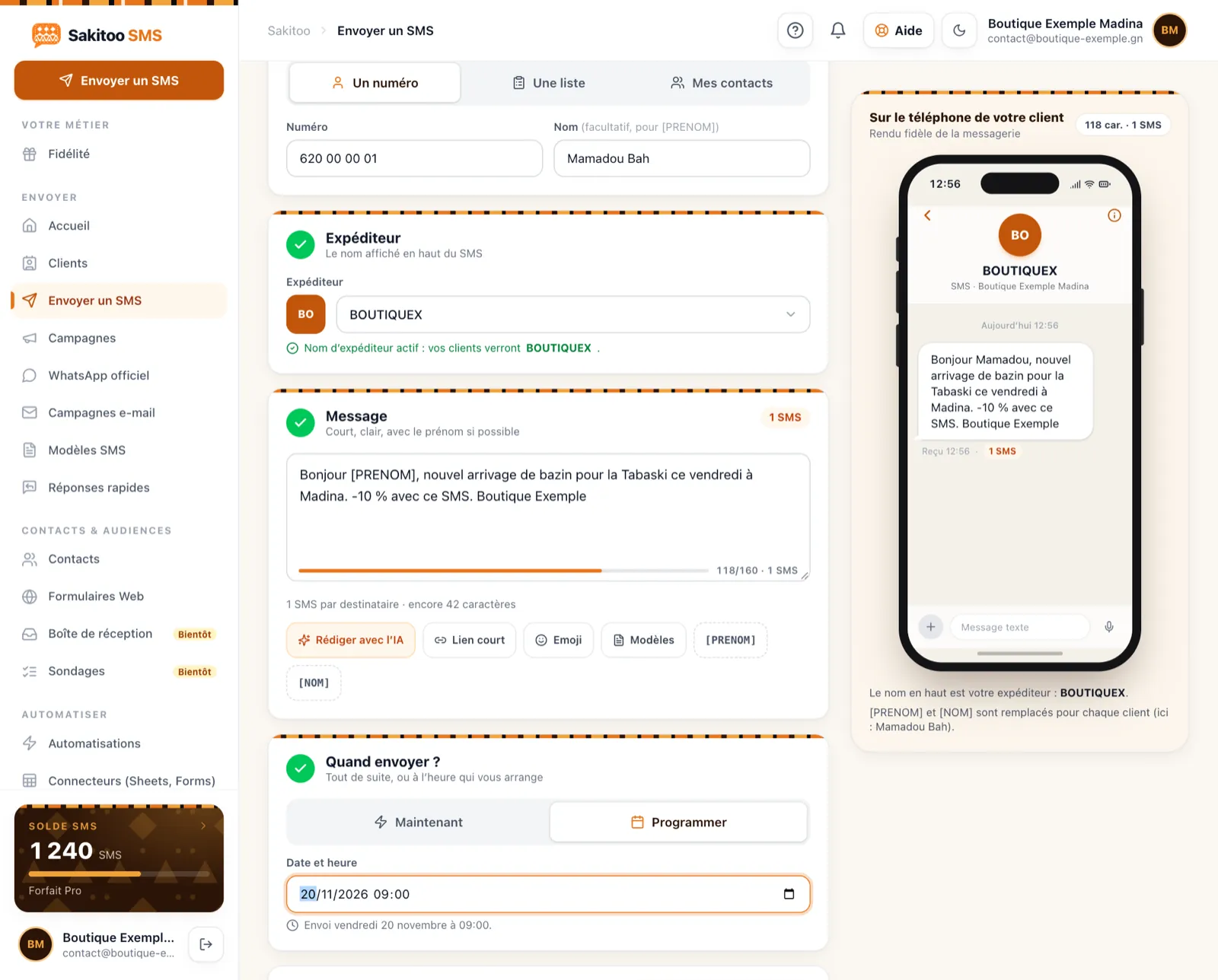
Table of Contents
- What you lose by sending messages “whenever you think of it”
- How to Schedule an SMS
- Choosing the Right Day and Time
- Create a one-month calendar
- Programming or automation?
- Examples by Industry
- How much does it cost?
- Mistakes to Avoid
What you lose by sending messages “whenever you think of it”
Messages Sent Too Late
A sale announcement that arrives on Saturday at 6 p.m., when customers have already done their shopping, is practically useless. A parent-teacher meeting announcement sent the night before doesn’t leave enough time to make arrangements.
Messages at the wrong time
A text message received at 11 p.m. is disruptive. A text message received during Friday prayers goes unnoticed. When we send messages on the fly, we often send them at a time that’s convenient for us, not for the customer.
Missed Messages
On a holiday, when a shipment arrives, or on the evening of a deadline: it’s precisely when you’re busiest that you forget to write.
Message quality
When written in a hurry, between client appointments, a text message may contain mistakes or omit the date or location. When written calmly, proofread, and tested on your own number, it’s clearer and more effective.
How to Schedule an SMS
Messages are scheduled from the sending screen, whether on a computer or on the Android app.
1. Write the message
Enter your text. Use variables (such as “first name”) so that each customer receives a personalized message. The counter shows how many SMS messages the message will use: if it exceeds one SMS, see if you can shorten it.
2. Select the recipients
One contact, one label (“Madina customers,” “6th Grade A parents”), or multiple labels. Unsubscribed contacts are automatically excluded.
3. Select the date and time
Instead of sending immediately, specify the date and time. The time is in Conakry time.
4. Review the summary
Number of recipients, number of text messages, sender’s name, date, and time. It’s time to make corrections.
5. Confirm
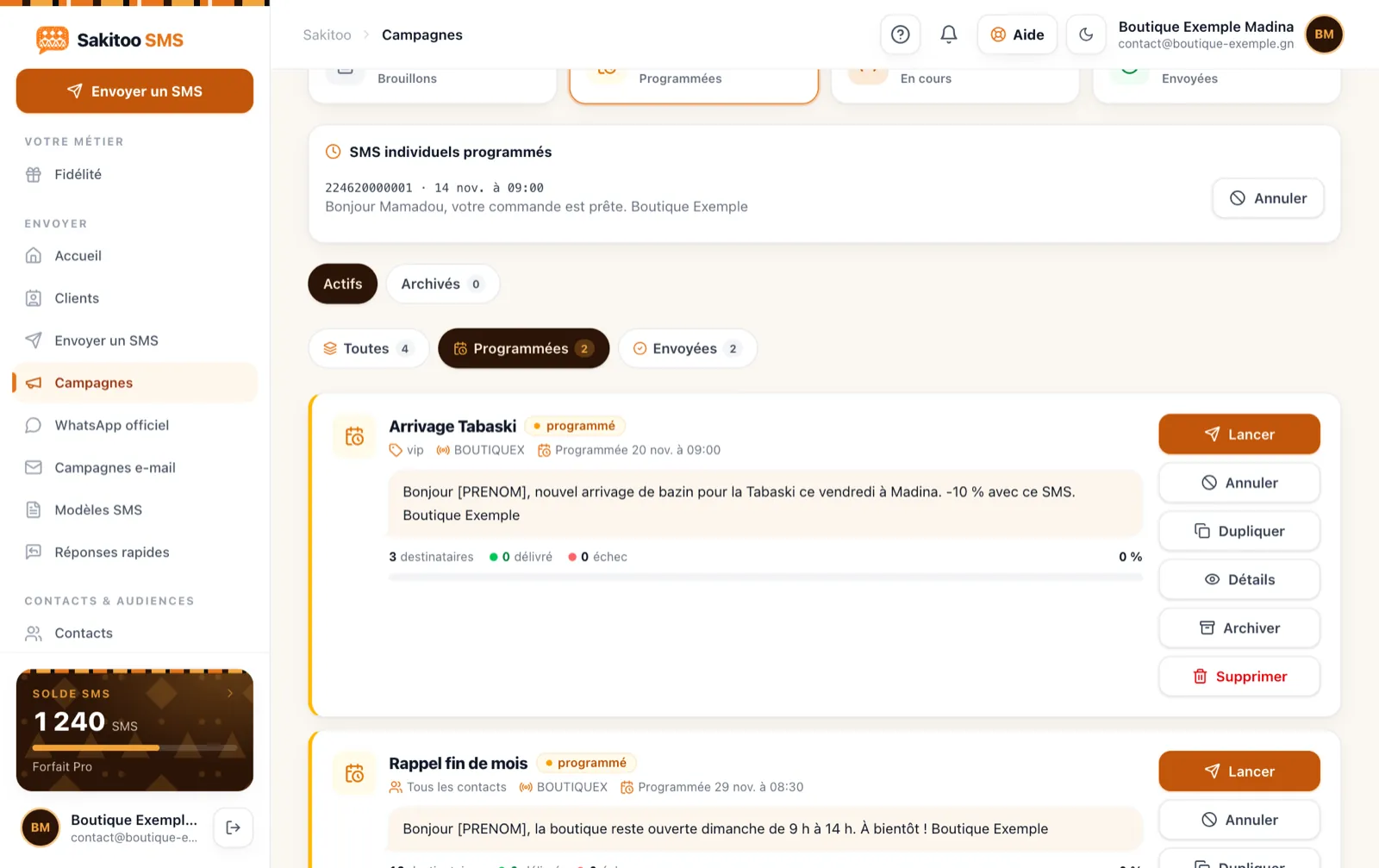
The campaign appears in the list of scheduled campaigns. You can shut down your computer—it will run on its own.
6. View the report
After sending, the report shows which messages were delivered and which failed. Numbers with repeated delivery failures should be checked.
A complete description of how it works is available on the page How it works.
Choosing the Right Day and Time
There is no “magic time” that works for everyone. Here are some common-sense guidelines for Guinea—adapt them to your customer base and verify them using your own reports.
The most common hours
- In the morning, between 8 a.m. and 10 a.m. : People check their phones before or at the start of the day. Great for daily reminders and announcements.
- Early in the afternoon : After lunch, for less urgent messages.
- At the end of the day, before 7 p.m. : for ads to be published the next day.
Times to Avoid
- At night (after 9 p.m. and before 7 a.m.).
- Prayer times, particularly the Friday prayer.
- Share the joy of special family moments on a holiday: send your greetings first thing in the morning.
The Right Day
- For a business: an announcement about a promotional weekend is usually sent out on Thursday or Friday morning.
- For a school: meeting reminders are sent two or three days in advance, followed by a reminder the day before.
- For a clinic: the day before the appointment, see Our guide to appointment reminders.
- For a deadline: one or two days before the date.
Test and compare
Send one campaign on a Tuesday morning, the next one late Thursday afternoon, and compare what happens in-store or over the phone. Your customers will tell you better than any guide what time works best for them.
Create a one-month calendar
The real strength of this schedule is that it lets you plan the entire month in a single session.
Sample schedule for a store in Madina
| Date | Audience | Message |
|---|---|---|
| Monday, the 1st, 9 a.m. | All customers | New Arrivals This Month |
| Thursday, the 11th, 9 a.m. | Loyal customers | Preview of the promotion |
| Friday, the 12th, 8 a.m. | All customers | Weekend Promotion |
| Thursday, the 25th, 5:00 p.m. | Inactive customers | “We miss you,” a special offer |
These dates are examples; adjust them to suit your business.
Key Dates of the Year in Guinea
Prepare your messages in advance for times when everyone is busy:
- the start of the school year;
- the start and end of Ramadan;
- Eid al-Adha;
- Independence Day, October 2;
- the end-of-year holidays;
- container arrivals, if you know them in advance.
A 30-minute session
Once a month, sit down with your list of dates, write the messages, test them on your own number, and schedule them. Then you don’t have to think about it again until the following month.
Programming or automation?
The two features are similar but serve different purposes.
| Scheduled campaign | Automation | |
|---|---|---|
| When it goes out | Once, on the selected date | Whenever an event occurs |
| Who is it for? | A list or a label | Each relevant contact |
| Examples | Eid al-Adha promotion, parent-teacher meeting | Birthdays, welcoming new customers, payment due date reminders |
| Effort | You design each campaign | Pay once, and it runs on its own |
Start with scheduled campaigns. If the same message is sent every month, turn it into an automated process. The options are listed on the page Automation and in Our article on birthday text messages.
Recurring messages
In addition, recurring messages allow you to repeat the same campaign every week or every month: membership fee reminders, weekly menus, and on-call schedules.
Examples by Industry
These messages are examples and should be adapted as needed.
Business
Example: Scheduled for Friday at 8 a.m.: “Hello Fatoumata, this weekend, 15% off wax fabrics at Bah Couture in Madina. Show this text message in the store.”
School
Example: Scheduled three days in advance: “9th-grade parent-teacher meeting on Saturday, November 22, at 10 a.m. Your attendance is important. Les Palmiers School Complex, Kipé.”
For a complete guide to organizing a school, see Our article on text messaging for schools.
Association and tontine
Example: Scheduled on Sunday for Wednesday: “Reminder: Tontine contribution on Wednesday at 6 p.m. at Ms. Sylla’s.”
Restaurant
Example: Scheduled every Friday at 11 a.m., “This Friday, rice with coconut milk and braised fish at Maquis de Taouyah. Call 6XX XX XX XX to make a reservation.”
Customer Service
Example: Scheduled 6 months after installation: “Hello, Mr. Kourouma, we recommend that you have your air conditioner serviced. Reply to this number to schedule an appointment.”
How much does it cost?
There are no additional setup fees: you only pay for the SMS messages you send. Prices listed on The Pricing Page, verified on November 13, 2026.
| Package | SMS | Prices | Price per SMS |
|---|---|---|---|
| Explore | 50 | 12,500 GNF | 250 GNF |
| Starter | 200 | 42,000 GNF | 210 GNF |
| Pro | 1 000 | 205,000 GNF | 205 GNF |
| Business | 5 000 | 1,025,000 GNF | 205 GNF |
| Business | 20 000 | based on a quote | based on a quote |
- Purchased text messages never expire.
- A long message counts as multiple SMS messages: the number is displayed before you confirm.
- The sender's name is free with the Pro plan (1,000 SMS).
- The industry-specific plans (Education, Healthcare, Retail, All-Inclusive) include a monthly allowance of text messages and automation tools.
To estimate your budget, multiply the number of contacts by the number of campaigns planned for the month. Example: 300 customers and 3 SMS campaigns = 900 SMS; the Pro package covers this month with a small margin to spare. More details at Our article on the cost of an SMS in Guinea.
Mistakes to Avoid
Do not test
Always send the message to yourself first before scheduling it for everyone. A mistake in the price or date can lead to confusion.
Forget the balance
Make sure your balance is sufficient to cover all your campaigns for the month. Automatic top-ups can help you avoid the unpleasant surprise of a campaign being blocked.
Schedule an offer that no longer exists
If stock is out or the meeting has been rescheduled, cancel the campaign. A false message costs more than no message at all.
Sending too often
Scheduling is easy—all the more reason to be reasonable. A business should send no more than one or two messages per week, and they should always contain genuine information.
Send to strangers
Programming doesn’t change the basic rule: only text people who have given you their number. No purchased lists.
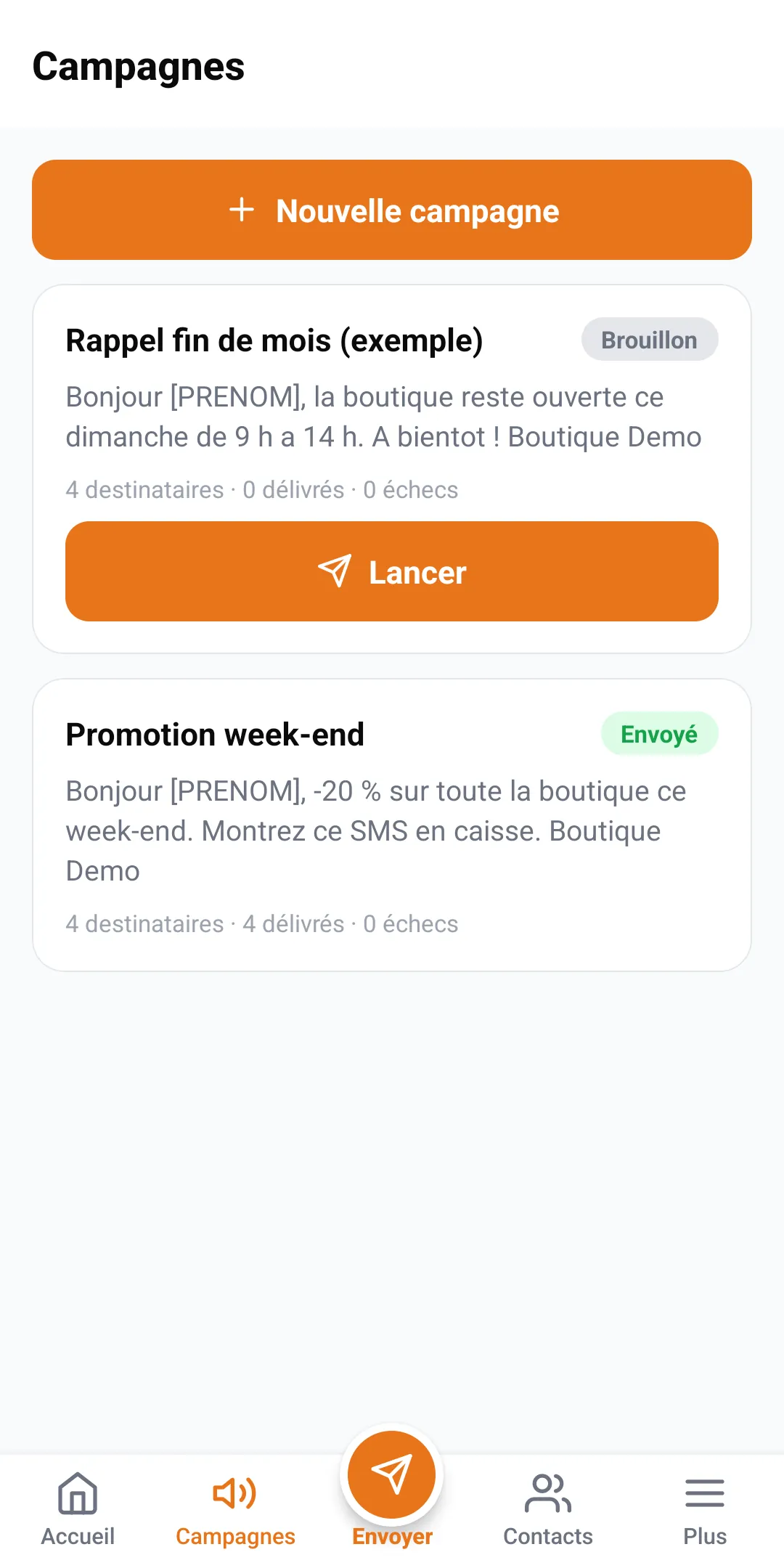
Schedule from your phone
Many business owners and school principals manage everything from their phones. The Sakitoo SMS Android app lets you set up a campaign just as you would on a computer: drafting the message, selecting a label, setting the date and time, and reviewing the details.
A few tips for using the phone:
- Compose your long messages on a computer if you have one, and use your phone for quick messages and to double-check them;
- Save your frequently used messages as templates so you don’t have to retype them on a small keyboard;
- Check the list of campaigns scheduled for the morning: you can see at a glance what will be sent out that day.
Collaborating with Others
In a school or business, multiple people often draft messages. Set a simple rule: one person approves the monthly schedule, and the others submit their messages by a deadline. This prevents two campaigns from being sent to the same contacts on the same day, which can annoy recipients and waste SMS credits.
Questions to ask yourself before confirming
Before each scheduling session, take ten seconds to answer these five questions:
- Is the message useful to the recipient? On that day, at that time?
- Is this information accurate? : price, date, location, phone number?
- Is this the right audience? : the entire list, or just one tag?
- Can the message fit into a single text message? ? If not, can you shorten it?
- Do you have enough credit? For this campaign and those to come?
If you answer “yes” to all five questions, you can proceed with confidence.
Quick checklist before scheduling
- The date and time are indeed those of Guinea.
- The text has been proofread and tested using your own phone number.
- The selected label matches the right people.
- Your balance covers the number of SMS messages shown.
- You know where to find the campaign so you can modify it if something unexpected comes up.
- A member of the team is available to answer any calls that come in after the messages are sent.
Conclusion: Write when you have time; send when your customers are available.
Scheduled messaging turns text messages into a planning tool. You can prepare your entire month’s messages in a single session; your messages are delivered at the optimal time to all networks in Guinea—Orange, MTN, and Cellcom—and you stay connected with your customers even on days when you don’t have a minute to spare.
Create your account and set up your first campaign: a Discovery Pack is all you need to get started.
Frequently Asked Questions
How do I schedule an SMS in advance?
Compose your message on the "Send" screen, select the recipients, and then specify the date and time to send it instead of sending it right away. The message will be sent automatically at the scheduled time.
Is the scheduled time in Guinea?
Yes, the time you select is Conakry time. Be sure to check the summary before confirming, especially if your phone is set to a different time zone.
Can I cancel or modify a scheduled campaign?
As long as it hasn't been sent yet, you can cancel it from the campaign list and set up a new one.
Is my balance deducted when I schedule a message or when it is sent?
Make sure you have enough SMS credits for the campaign when you send it. The number of SMS credits required is displayed before confirmation.
Should you leave your computer or phone turned on?
No. The campaign is saved on the platform and will be sent at the scheduled time, even if your device is turned off.
How does this differ from automation?
A scheduled campaign is sent once, on a specific date. An automated message repeats or is triggered based on an event: a birthday, a new contact, or a due date.