School SMS in Guinea: Notifying Parents in a Timely Manner

School SMS in Guinea: Notify every parent on time, without spending the whole day on it
A parent-teacher meeting where half the room is empty. A student who’s been absent for three days without the family knowing. Tuition payments two months overdue because no one had time to follow up. If you run a school in Conakry, Kindia, or Labé, you’re familiar with these situations. The School SMS Guinea is the easiest way to avoid them: a short message, sent on behalf of the school, received by every parent on their phone—even the most basic one. This article shows how the SMS for Schools How Sakitoo SMS works, the benefits it offers, and what it really costs.
Table of Contents
- What Schools Lose Without SMS
- Why SMS rather than chat groups?
- The 6 most common messages sent by schools
- The School Kit: Calls, Fees, Announcements
- Set up in one afternoon
- How to Write to Parents
- Examples by type of business
- How much does it cost?
- FAQ and trial
What Schools Lose Without SMS
The correspondence log and word of mouth have their limitations, and those limitations come at a cost.
- Administrative support services. Calling 200 families to announce a meeting means spending an entire day on the phone, dealing with busy lines and numbers that don’t answer.
- Money that isn't coming in. Unpaid tuition fees are eating into teachers’ salaries. If there’s no time to follow up on a payment, it gets pushed back to the next month.
- Trusted by families. A parent who finds out a week later that their child was absent doesn’t wonder if the school is overwhelmed—they wonder if it takes its responsibilities seriously.
- Messages that don't arrive. A note slipped into a backpack sometimes stays in the backpack.
Text messages do not replace relationships with families. They simply ensure that basic information reaches every parent on the same day.
Why SMS rather than chat groups?
Many schools already use a group chat for each class. This is useful for communication, but less so for reliably sharing information:
| Criterion | Discussion group | SMS sent on behalf of the school |
|---|---|---|
| Basic phone, no internet | No | Yes |
| A message lost among many others | Often | No, he's coming alone |
| Private information (unpaid bills, absence) | Avoid doing this in front of the whole group | Individual message |
| Delivery confirmation | Partial | Status by number |
| Display Name | The teacher's phone number | The name of the school |
| Teacher’s personal phone number displayed | Yes | No |
A reminder about tuition fees or an absence should never be announced in front of all the parents in a class. Text messages are sent individually, and that is their true strength for a school.
SMS messages are sent to all networks in Guinea: Orange, MTN, and Cellcom. You don’t need to know which carrier each parent uses (see Which networks can be used to send an SMS in Guinea?).
The 6 most common messages sent by schools
The text below consists of templates. The elements in square brackets are automatically replaced for each student.
1. The Absence of the Day
GS LE SAVOIR: [First Name] is absent this morning. Please let us know the reason by calling 6XX XX XX XX.
Sent immediately after the call, this message allows the family to respond the very same day. It’s often the one that parents appreciate the most.
2. Tuition fee collection
GS LE SAVOIR: The remaining balance due for [First Name] ([Class]) is [Amount] GNF. Please settle the balance by [Date]. The accounting office is open from 8 a.m. to 2 p.m.
Polite, precise, and non-threatening. Stating the exact amount avoids back-and-forth communication. To learn more, read Send SMS reminders for overdue payments.
3. The Parent-Teacher Meeting
GS LE SAVOIR: [Class] parent meeting on Saturday at 9 a.m. in the multipurpose room. Your attendance is important.
Schedule three days in advance, then set a reminder the day before.
4. Temporary Closure
GS LE SAVOIR: School will be closed tomorrow, Thursday. Classes resume Friday at 8 a.m.
When speed matters most: in just a few minutes, all families are notified.
5. Results and Reports
GS LE SAVOIR: First-quarter report cards will be distributed on Saturday from 9 a.m. to 12 p.m. Please bring [First Name]’s report card.
6. Greetings and Events
GS LE SAVOIR wishes the entire family of [First Name] a happy Eid al-Adha. Classes resume on Monday.
A friendly message every now and then serves as a reminder that the school doesn’t just write to make demands.
The School Kit: Calls, Fees, Announcements
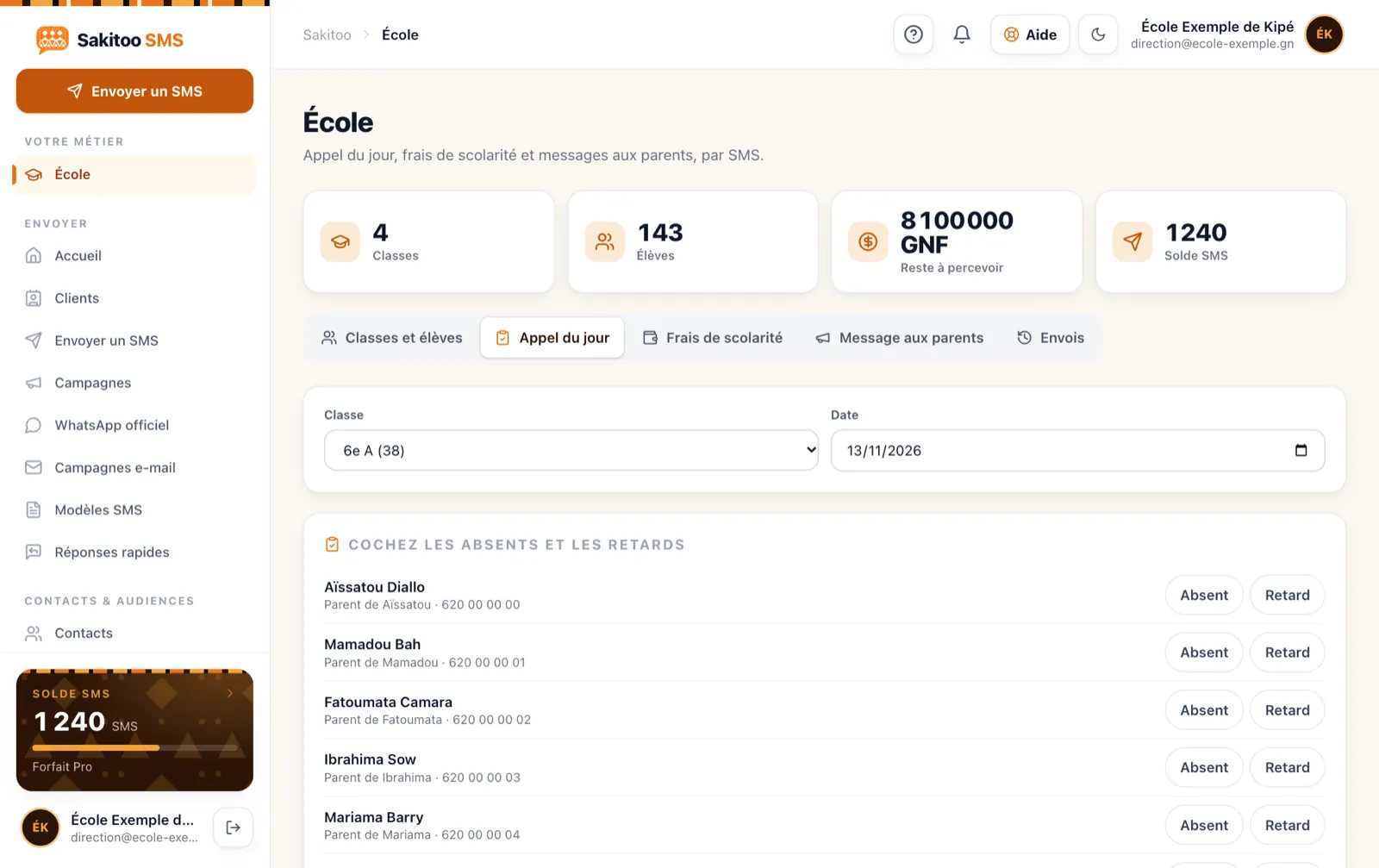
Sending SMS messages to a list is something any platform can do. What saves a school time is a tool that integrates the messages into the school’s daily operations. The Sakitoo SMS School Kit (section /school) includes:
- Classes and students, along with the parents' phone number(s).
- Today's Special : The teacher or proctor checks off the absent students, and the family of each absent student can be notified with a single click.
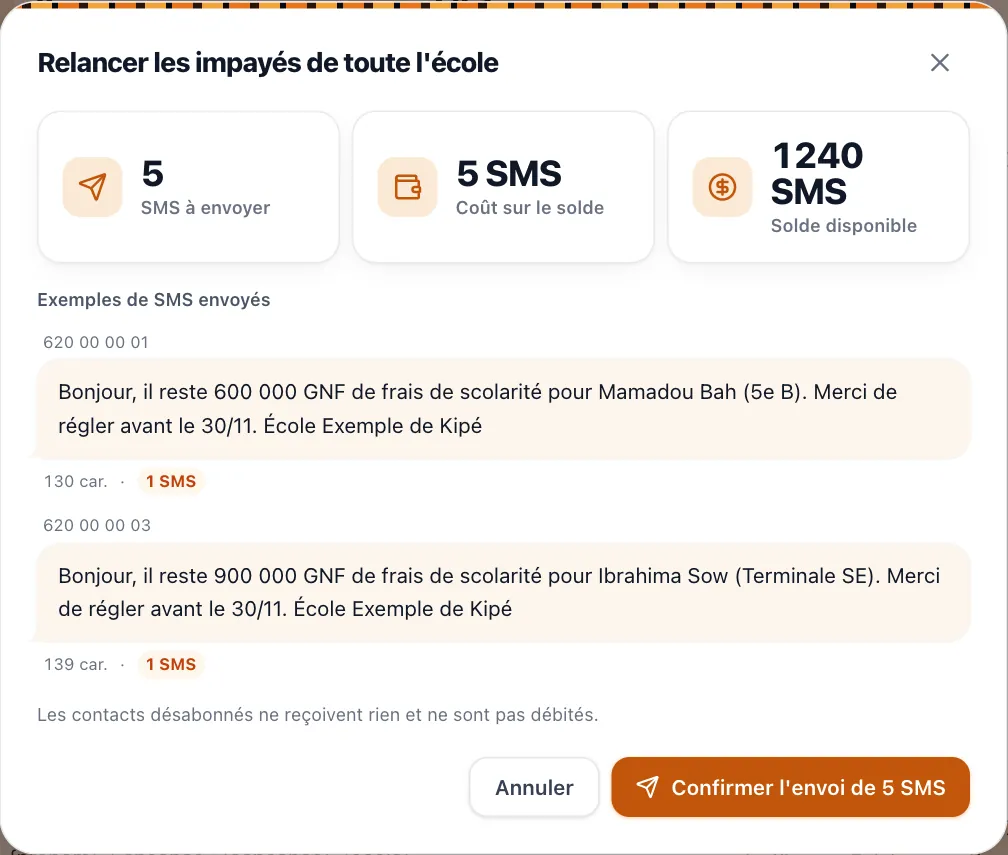
- Tuition fees : You record what is owed and what has been paid, and you send reminders only to the families concerned, with the correct amount.
- Advertisements to the entire school, to a specific grade level, or to a single class.
How this changes things on a daily basis
Example: A Monday at a school in Matoto. At 8:15 a.m., roll call is taken in each classroom. At 8:30 a.m., the families of the 12 absent students receive a text message. By 10:00 a.m., three parents have called back to explain the reason for their child’s absence. On Friday, the accountant sends a single reminder to the families who still owe money, specifying the amount owed for each family. No one spent the morning on the phone.
This is a typical scenario provided for illustrative purposes; the numbers are given as examples.
Schedule in advance
Meetings, the start of the school year, exams: the dates are known weeks in advance. You can draft the message and choose the day and time to send it. Details are available at Schedule your SMS campaigns.
Set up in one afternoon
- Create your account on sakitoosms.com.
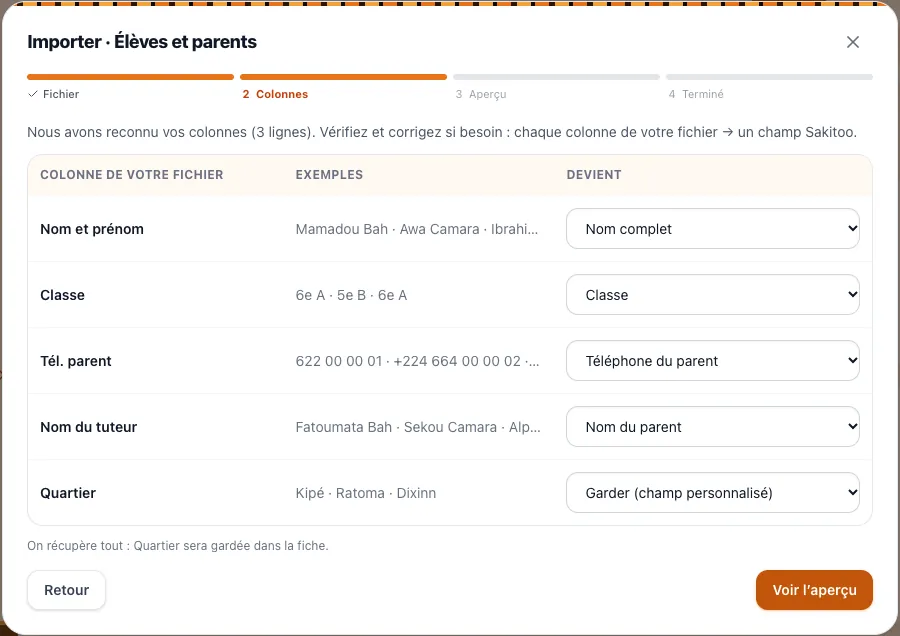
- Import your list Import student data from your Excel or CSV file. The smart import feature recognizes the columns (student name, class, parent name, phone number) and displays a preview before confirmation. Incorrectly entered or duplicate phone numbers are flagged.
- Request your sender name, for example, “GS-LESAVOIR.” Parents will see this name instead of an unknown number. See The SMS sender's name.
- Try it out in a classroom Includes a free trial (one class, 30 students).
- Notify families At the back-to-school meeting: “From now on, you’ll receive school updates via text message, sent on behalf of the school.”
This last point is important. A parent who is aware of the message will read it; a parent who is caught off guard may ignore it or be suspicious of it.
How to Write to Parents
A few simple rules can make the difference between a message that gets read and one that gets ignored.
- Start with the school's name, even if the sender's name is already displayed. On some phones, the preview shows only the beginning of the text.
- One piece of information per message. A meeting and an overdue payment in the same text message—that’s a confusing message.
- Keep it short. If a message exceeds the length limit for a single SMS, it will be counted as multiple messages. The exact number is displayed before sending, and the composition assistant can suggest a version that fits into a single message.
- Avoid sending messages late at night. Sending an SMS at 10 p.m. about someone’s absence causes unnecessary worry. Instead, schedule it for the morning.
- Enter a contact. A phone number or office hours: parents know what to do.
- Keep the language in mind. If some families have difficulty reading French, a few words from the director at the meeting are worth more than a long text message. Keep sentences simple, and make sure numbers and dates are clear.
Mistakes to Avoid in the First Year
Send everything to everyone. A meeting for fifth-graders doesn’t concern kindergarten parents. Send messages by class or grade level: you’ll save on text messages, and parents will stay in the habit of reading them because each message is relevant to them.
Resend without verifying. Before sending any payment reminders, update your records with any payments received. A parent who paid yesterday and receives a reminder today will call, unhappy. The School Kit only sends reminders to families who still have an outstanding balance according to your records: the effectiveness of the reminder depends on keeping payment records up to date.
No need to worry about number changes. Schedule a reminder at the beginning of the quarter: “If your number has changed, please let the office know.” Numbers that consistently fail to connect appear in the reports; call these families once.
Send multiple messages. If you send more than a few text messages per month per family—excluding absences—parents will lose interest. Consolidate brief updates into a weekly announcement.
Ignore the tone. A blunt message about an unpaid bill can be humiliating for a family in need. Always provide a point of contact and, if your school allows it, the option of a payment plan.
Examples by type of business
These examples are typical scenarios, not customer testimonials.
Example: a small private school in Dubréka (fewer than 150 students). The director manages everything herself. She mainly uses fee reminders at the beginning of the month and closure announcements. The “Small School” plan is sufficient for her needs.
Example: a school complex in Ratoma (preschool, elementary, and middle school). The head monitor takes attendance on a tablet, the accounting department tracks expenses by class, and the administration sends announcements by grade level. The “School” plan, with no limit on the number of students, is a good fit.
Example: a high school in Kankan. Students are more independent, but parents want to stay informed. Text messages about repeated absences and exam dates are a top priority.
Example: a training center in Kaloum. The students are adults: text messages are sent directly to them (schedule, classroom, date for receiving certificates).
Example: a university or college. Exam schedules, available results, registration fees: the same tools are used, but on a larger scale.
How much does it cost?
Two payment options, depending on your needs (prices verified on 11/13/2026, see /pricing).
School Plans (tool + SMS included)
| Plan | Monthly price | SMS included | Who is it for? |
|---|---|---|---|
| Small-scale school | 100,000 GNF | 150 | Fewer than 150 active students |
| School | 200,000 GNF | 300 | Unlimited classes and students |
| All-inclusive | 450,000 GNF | 1 000 | Education + Health, Calendar, Business, Customer Profiles, Analytics |
With annual billing, you pay for 10 months out of 12. These plans include the daily call, tuition fees with reminders, and announcements to parents.
Additional SMS packages
If you exceed the included SMS limit, or if you only want to send announcements without using the School tool:
| Package | SMS | Prices |
|---|---|---|
| Explore | 50 | 12,500 GNF |
| Starter | 200 | 42,000 GNF |
| Pro | 1 000 | 205,000 GNF |
| Business | 5 000 | 1,025,000 GNF |
| Business | 20 000 | based on a quote |
SMS messages purchased in bundles do not expire. The sender’s name is included free of charge starting with the Pro bundle (1,000 SMS messages).
Get a quote for your school
Consider the number of families you serve and the number of messages you actually send each month: a general announcement, one or two payment reminders for some of the families, and the absences for the month. Example: 120 families, one announcement per month (120 SMS), and one follow-up for 30 families (30 SMS) total 150 SMS—exactly what’s included in the “Small School” plan. Compare this to the time spent on the phone and the late payment fees. To compare all the options, read How much does an SMS cost in Guinea?.
Notify parents starting this week
Every week without this tool means absences discovered too late, invoices rescheduled for “when we have time,” and half-empty meetings. With an SMS sent on behalf of the school, the information reaches every family on the same day, on any phone.
To get started:
- Check out the kit on the School page and start a trial in one class;
- See the complete list of business tools ;
- See the step-by-step guide at How it works.
The next parent you notify in time is one less problem to deal with tomorrow.
Frequently Asked Questions
Do parents need to install an app?
No. They receive a standard text message on any phone, even a basic model, on all networks in Guinea: Orange, MTN, and Cellcom.
How much does the “School” tool cost?
The "Small School" plan (up to 150 students) costs 100,000 GNF per month and includes 150 SMS messages; the "School" plan costs 200,000 GNF per month and includes 300 SMS messages. Prices verified on November 13, 2026.
Can I import my student list from Excel?
Yes. The import function recognizes the columns (student, class, parent, number) and shows you a preview before you confirm.
Is the text message signed with the school's name?
Yes, with a verified sender name (for example, “GS-LESAVOIR”). It’s free starting with the Pro plan (1,000 SMS).
Can I try it before I pay?
Yes, a free trial allows you to test the tool with a class of 30 students.