Which networks can be used to send an SMS in Guinea?
Which networks can be used to send an SMS in Guinea? The simple answer
You have a list of customers, parents of students, or members. Some use one carrier, others use a different one, and many have two SIM cards. So the question keeps coming up: Which networks can be used to send an SMS in Guinea?, and how can you be sure that everyone receives the message? With Sakitoo SMS, the answer is simple: a single message is sent to All networks in Guinea: Orange, MTN, and Cellcom. This article explains what this means for you, the pitfalls to avoid with phone numbers, and what you’re missing out on by continuing to send messages “manually.”
Table of Contents
- The problem: one list, multiple networks
- What “all networks” means
- How to Identify a Valid Guinean Phone Number
- Prepare a clean list before sending
- Find out if the message actually arrived
- The sender's name is the same everywhere
- Examples by Industry
- Comparison: Manual messaging vs. a platform
- How much does it cost?
- FAQ and Call to Action
The problem: one list, multiple networks
In Guinea, a single contact list almost always includes numbers from multiple carriers. A shopkeeper in Madina has customers with each of them; a school in Ratoma has parents who switch SIM cards depending on current promotions; an NGO in Kankan receives handwritten phone numbers, sometimes without area codes.
When sending messages from your own phone, you quickly run into three limitations:
- Volume. A cell phone isn't designed to send 300 messages in a row. Sending messages this way is slow, and your SIM card may be blocked if the carrier detects unusual activity.
- The hidden cost. "Unlimited SMS" plans often cover only a single network or personal use. Sending messages to everyone can exceed your plan’s limit without you realizing it.
- The lack of evidence. You don't know who received the message, who didn't, or why.
The result: some parents are never notified about the meeting, some customers never see the promotion, and you only find out about it after the fact.
What “all networks” means
A professional SMS platform like Sakitoo SMS is connected to the country’s mobile network operators for SMS delivery. Specifically, for you:
- You do not choose a network. Write your message, select your contacts, and send. Each text message is routed to the recipient’s network.
- You do not manage a SIM card. Nothing is sent from your personal number. Your phone remains free to use, and your number is not exposed.
- The price does not depend on the network. A text message sent to a subscriber of one carrier costs the same as a text message sent to a subscriber of another carrier.
In a nutshell: the question “Which network?” is no longer your problem. You can focus on what you’re saying, not on how the message gets delivered.
What about customers who have two SIM cards?
This happens often. If you have two phone numbers for the same person, save both in their contact information, but choose the one they check most often for your regular messages. Sending the same message twice to the same person costs two text messages and is more annoying than reassuring.
How to Identify a Valid Guinean Phone Number
Most of the time, an SMS “that doesn’t arrive” has nothing to do with the network: the number is simply misspelled. A Guinean cell phone number consists of 9 digits and begins with 6. With the international dialing code, it is written as +224 followed by these 9 digits.
The most common errors in files:
| What's in the file | Problem | What You Need |
|---|---|---|
| 62 00 00 00 | 8 digits: one is missing | Find the missing number |
| 00224 620 00 00 00 | International dialing code (old format) | Accepted, reformatted to the correct format |
| 620-00-00-00 / 620.00.00.00 | Separators | Automatically removed |
| 620,000,000 / 620,000,000 (twice) | Duplicate | Single message |
| “Phone: 620,000,000 (Mamadou)” | Text combined with the number | Separate the name and the number |
The numbers above are fictitious.
Sakitoo SMS recognizes these variations during import and alerts you to invalid numbers before you pay for them. This is where a significant portion of your budget is at stake: every invalid number kept on the list means one SMS purchased for nothing with every campaign.
Prepare a clean list before sending
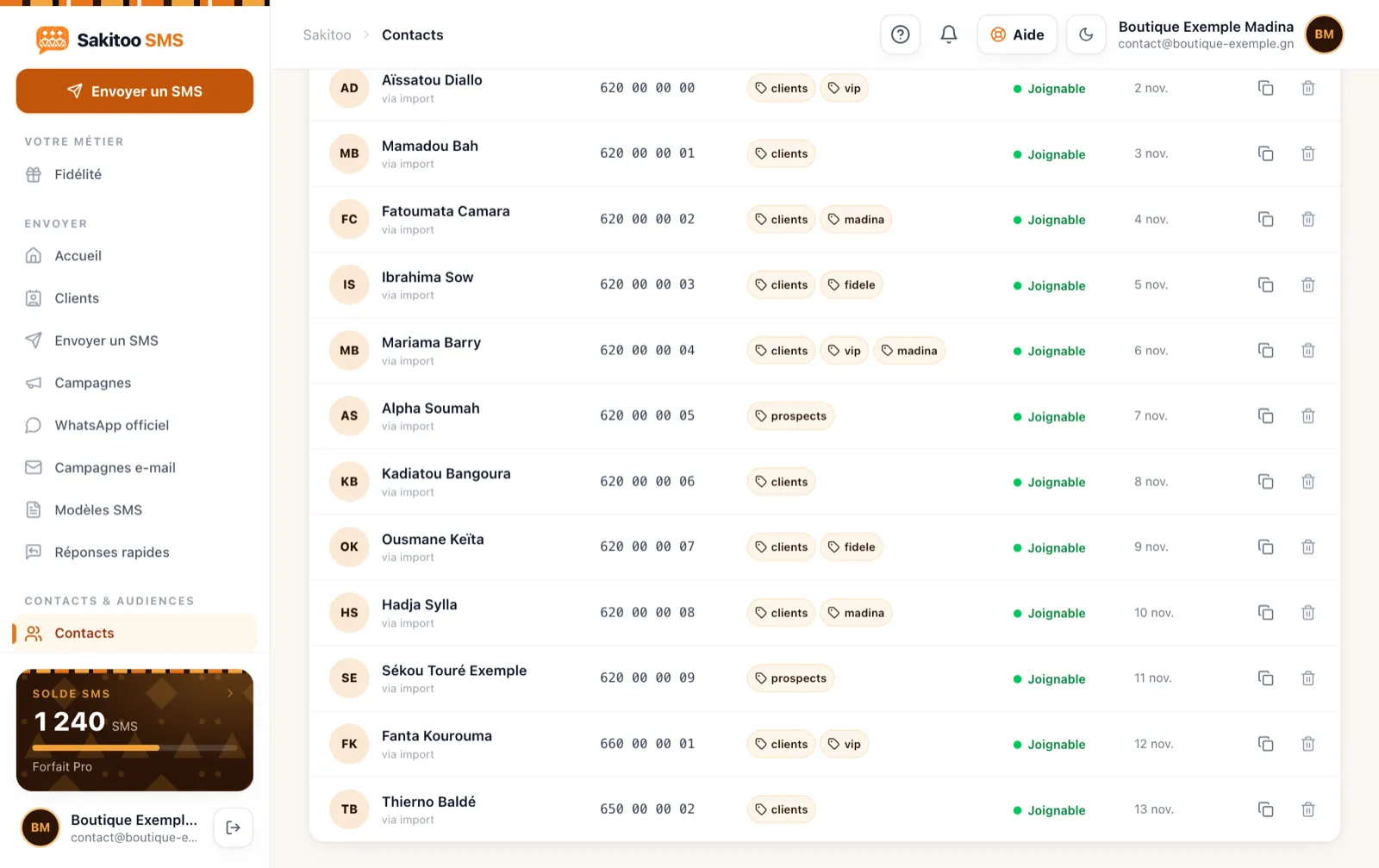
You can import your contacts from an Excel or CSV file, from your phone’s address book using the Android app, or simply paste a list. The smart import feature identifies the columns (last name, first name, phone number, class, neighborhood, etc.) and shows you a preview before you confirm.
For large contact lists, the tool Number cleansing (section Tools) filters out duplicates, numbers that are too short, foreign formats, and blank lines all at once. It’s included with all accounts, with a size limit that increases based on your plan (500 numbers with the Basic Plan, 20,000 with the Pro Plan, 50,000 with the Business Plan).
Three habits that help prevent most failures:
- Add a label to each group (“Kaloum Customers,” “5th-Grade Parents,” “Matoto Tontine Members”). You’ll send messages to the correct group rather than to everyone.
- Remove people who have asked to stop receiving your messages. Sakitoo SMS can include an unsubscribe link; subscribers who unsubscribe are automatically excluded from future messages.
- Try it out for yourself first. Send the message to your own number and to a colleague on a different network. You’ll see exactly what your customers will see.
Find out if the message actually arrived
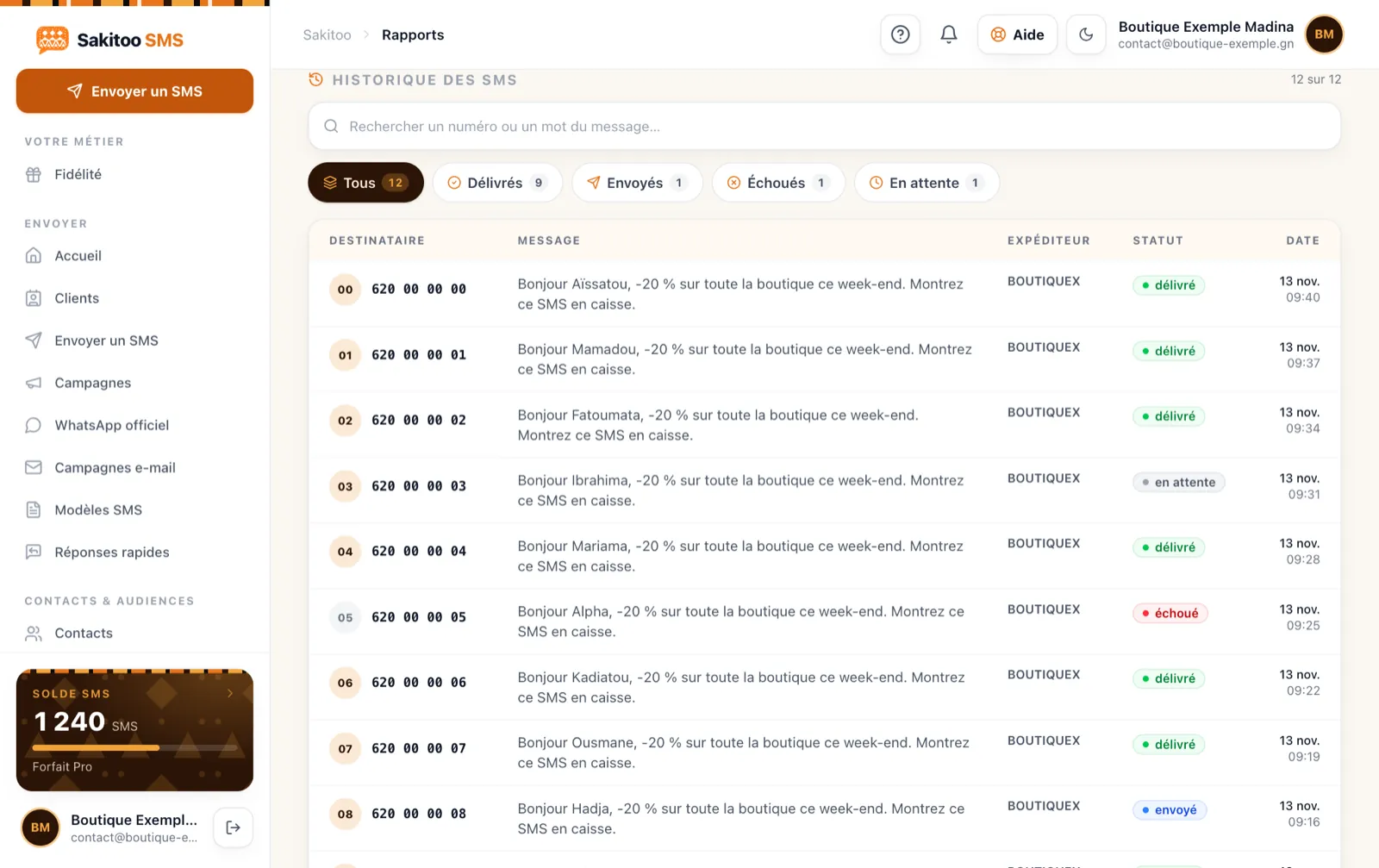
This is the main difference compared to sending a text message from a phone. After each message is sent, the section Reports Displays a status for each number based on delivery receipts:
- Sent : The message has been sent from the platform to the recipient's network.
- Delivered : The recipient's phone has received it.
- Failure : The number does not exist, the phone has been turned off for too long, or the line has been suspended.
A turned-off phone doesn’t mean the message is lost: the network keeps trying for a while. But if the same number fails campaign after campaign, it’s best to check with the person or remove it from the list.
What you’re missing out on without this tracking: You keep sending messages to inactive numbers, you pay for them, and—most importantly—you think you’ve notified people who never received anything. For a school announcing a special closure or a clinic rescheduling an appointment, this is no small matter.
The sender's name is the same everywhere
Your recipients won't see an unknown number, but rather the Name of your organization (for example, “ECOLE-HADJA” or “PHARMA-KIP”), on all networks in Guinea: Orange, MTN, and Cellcom. A message from a recognized name is read; a message from an unknown number is often ignored or even mistaken for a scam.
You can set the sender name from your account. It’s free with the Pro plan (1,000 SMS) or higher. See our article for full details. The "Sender Name" in SMS explained.
Examples by Industry
The examples below are typical scenarios, not customer testimonials.
Example: a fabric store in Madina. His list of 400 customers had been jotted down in a notebook for years. Once imported and cleaned up, only the valid numbers remain. The shop owner announces a new shipment on Thursday evening; on Friday morning, he reviews the report and follows up by phone with the few loyal customers whose messages failed to deliver.
Example: an elementary school in Kindia. Parents often change their SIM cards. At the start of each school year, the principal asks parents to confirm their phone number and adds a second number if available. Announcements are sent out on behalf of the school across all networks, and the report lists the families to be contacted. See also SMS for Schools.
Example: a microfinance institution in Labé. Members are distributed across several carriers. Payment due date reminders are sent out on the same day to everyone, so no one has to worry about which network to use.
Example: a clinic in Kaloum. Appointment reminders are sent automatically the day before. If a message fails to deliver, the secretary sees it in the morning and makes the call. See Appointment reminders via SMS.
Situations that may suggest a network problem
Before concluding that “the network isn’t working,” check these common issues. They account for the vast majority of undelivered messages.
The phone is turned off or out of range
In some rural areas, such as Upper Guinea or Forest Guinea, a recipient may be out of service for several hours. The message will reach them once they regain network coverage, provided it is within the retry time limit. For urgent information, send the message earlier in the day rather than in the evening.
The phone's memory is full
On basic phones, a full inbox blocks new text messages. The status then remains “sent” instead of changing to “delivered.” If a friend or family member tells you they aren’t receiving your messages, this is often the first thing to check.
The number has changed hands
A SIM card that has been inactive for a long time may be reassigned. Your message will still be delivered—but to someone else. That’s why it’s important to have numbers verified once a year, for example, at the start of the school year or when renewing membership in an organization.
The message contains a link or suspicious words
A message filled with all caps, “WIN,” or unknown shortened links may be filtered out or simply ignored. Write as you would when speaking to a customer: include your company name, provide clear information, and ask them to take a single action. Short links created through Sakitoo SMS remain under your platform’s domain name and are tracked in your reports.
The recipient has unsubscribed
If someone has clicked the unsubscribe link, they will be excluded from future messages. This is normal and serves as a safeguard for you: sending messages to someone who has opted out can damage your organization’s reputation.
Comparison: Sending from a Phone vs. a Platform
| Criterion | From your phone | With Sakitoo SMS |
|---|---|---|
| Related Links | Depending on your plan, often just one “unlimited” option | All networks in Guinea: Orange, MTN, and Cellcom |
| Display Name | Your personal number | Your organization's name |
| Volume | A few dozen, slowly | Send hundreds or thousands in a single batch |
| Customization (first name, amount) | Manually, one message at a time | Automatic |
| Delivery confirmation | None | Status by number |
| Programming | No | Yes, date and time |
| Risk to your SIM card | Possible blocking | None; your SIM card is not in use |
How much does it cost?
The price of an SMS does not depend on the recipient’s network. It depends on the plan selected (prices verified on 11/13/2026, see /pricing) :
| Package | SMS | Prices | Price per SMS |
|---|---|---|---|
| Explore | 50 | 12,500 GNF | 250 GNF |
| Starter | 200 | 42,000 GNF | 210 GNF |
| Pro | 1 000 | 205,000 GNF | 205 GNF |
| Business | 5 000 | 1,025,000 GNF | 205 GNF |
| Business | 20 000 | based on a quote | based on a quote |
Purchased text messages do not expire. A long message (longer than one text message, or containing certain special characters) counts as multiple text messages: the exact number is displayed before sending, so there are never any surprises. To compare the options in detail, read How much does an SMS cost in Guinea?.
Take action
You don’t have to choose between networks, buy a SIM card from each carrier, or spend an evening sending messages one by one. Just import your list, write your message once, and send it to everyone.
To get started:
- Create your account for free.
- Import your contacts and let the cleanup feature sort them out.
- Purchase the Discovery Pack (50 SMS) to test it with your actual customers.
- Send a message, then view the delivery report.
The complete step-by-step guide can be found on the page How it works and in our guide Send an SMS in Guinea.
Every message you don't send is a customer who never found out. Start with the next one.
Frequently Asked Questions
Do I need to sort my contacts by carrier before sending?
No. You import your list as-is; a single message is sent to all networks in Guinea: Orange, MTN, and Cellcom.
Does the price vary depending on the recipient's network?
No. An SMS costs the same regardless of the recipient’s network. Only the length of the message matters (a long message counts as multiple SMS messages).
Does my sender name appear on all networks?
Yes, once your sender name has been validated, it will be used for your messages sent to all networks in Guinea: Orange, MTN, and Cellcom.
How can you tell if an SMS has been delivered?
The delivery report displays a status for each number (sent, delivered, failed) based on delivery receipts.
Can I text numbers outside of Guinea?
Sakitoo SMS is designed for Guinean phone numbers (+224). For other countries, please contact us before sending.