Sending an SMS in Guinea: A Step-by-Step Guide
Send an SMS in Guinea from a computer or phone: a step-by-step guide
Would you like to Send an SMS in Guinea Want to reach your customers, parents of students, or your team without spending a whole morning on your phone? This article walks you through the entire process, from misspelled numbers to delivery reports. No theory here: just practical steps, the mistakes that cost you money, and the settings that ensure your message gets read.
Let’s start with a simple scenario that you’ll likely recognize.
Example: Fatoumata runs a hair salon in Kipé. She has 180 clients saved in her phone. Every time she wants to announce a promotion, she copies the message, sends it to one client, goes back to the list, and starts over. After sending forty messages, she gives up. The other 140 clients won’t hear a thing.
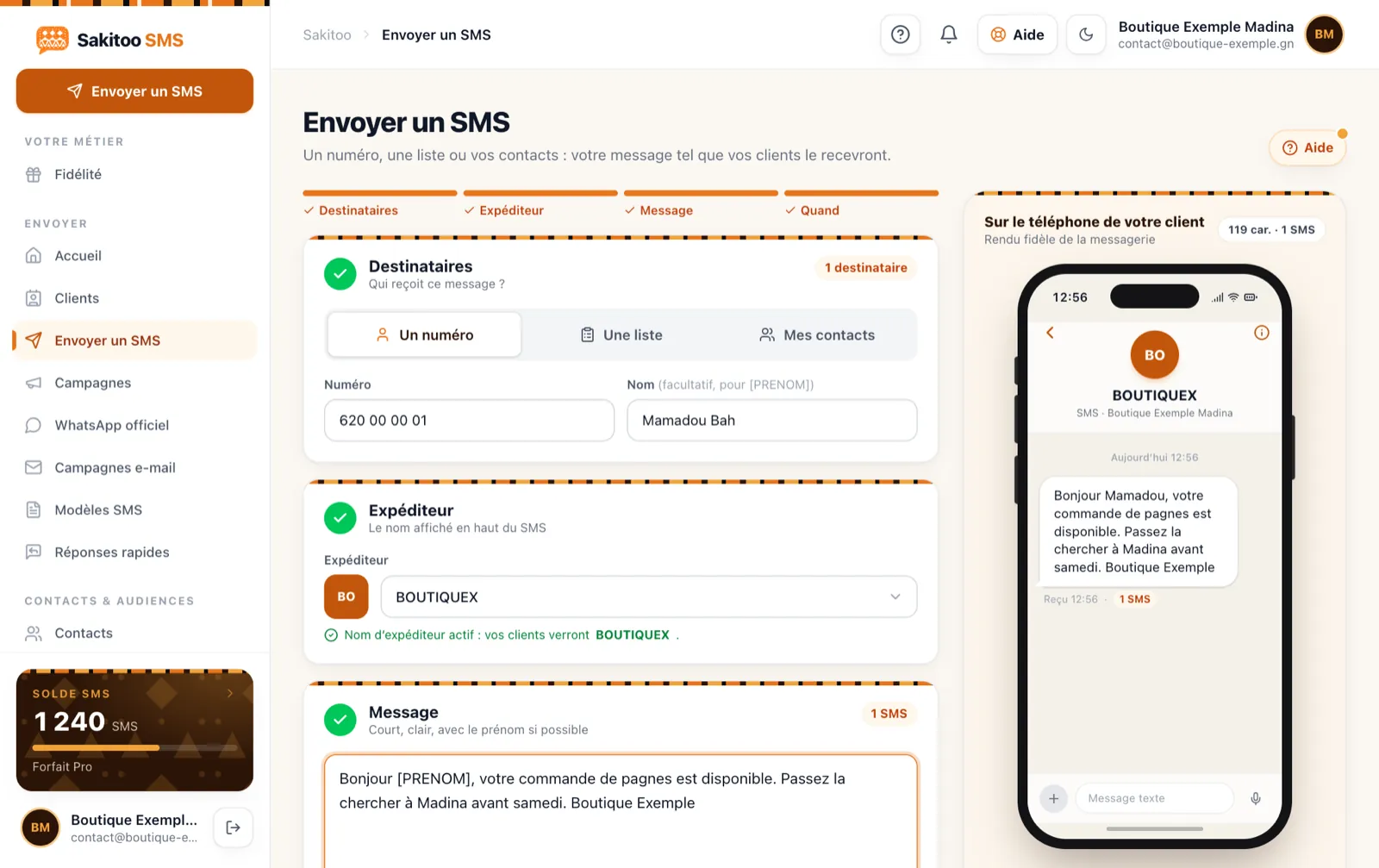
Table of Contents
- The problem with sending messages from your phone
- Step 1: Prepare your own phone numbers
- Step 2: Write a message that fits into one SMS
- Step 3: Choose the recipients
- Step 4: Choose the time
- Step 5: Verify, send, track
- The most common mistakes
- How much does it cost?
- Frequently Asked Questions
The problem with sending messages from your phone
Sending a few text messages from your phone is normal. But sending a message to your entire customer base this way means you’re creating three obstacles for yourself:
- Slow service. Each message requires several steps. Multiply that by 100, 200, or 500 contacts.
- Anonymity. Your customer sees a phone number, not the name of your salon. If she hasn’t saved it, she’ll be wary.
- Lack of follow-up. You don't know who received the message. Invalid numbers remain on your list, and you keep sending messages to them.
An online SMS platform like Sakitoo addresses all three of these issues. You compose the message just once, from your computer or phone, and it is sent to every contact on all networks in Guinea: Orange, MTN, and Cellcom.
Step 1: Prepare your own phone numbers
This is the step that’s often overlooked, and it’s the one that costs the most. An SMS sent to the wrong number is money down the drain.
The correct format for a Guinean phone number
A Guinean cell phone number has 9 digits, preceded by the country code +224 when dialing from abroad. However, the databases contain all sorts of entries:
- "622 00 00 00" with spaces;
- “00224622000000” or “+224 622000000”;
- “62200000,” with one digit missing;
- Two numbers in the same field, separated by a "/".
The platform automatically recognizes common spelling errors and corrects them to the proper format. Incomplete or invalid numbers are flagged rather than sent.
Import your contacts
There are three ways to do this, depending on where your numbers are located:
- Paste a list : Copy a column of numbers from a document and paste it.
- Import a file Excel or CSV: The smart import feature automatically identifies the “last name,” “first name,” and “phone number” columns, even if they have different labels.
- Select from the directory from your phone, from theSakitoo SMS Android app.
Remove duplicates
If the same customer is registered twice, they will receive two text messages, and you will be charged twice. The import feature detects duplicates. For very long lists, the number cleanup tool filters out duplicates before sending.
Step 2: Write a message that fits into one SMS
The 160-character limit
A standard SMS contains 160 characters, including spaces. If the message exceeds this limit, it is split into multiple parts, and each part counts as one SMS. Certain special characters (emojis, certain symbols) also reduce the available space. The counter on the "Send" page shows you in real time how many SMS messages your message will use.
The system that works
A good business text message consists of three steps:
- Who is speaking and to whom : “Hello, Aïssatou,”
- Information : “20% off braids this Saturday at the Kipé salon.”
- The initiative : “Make a reservation at 622 xx xx xx.”
No need for long messages. The sender’s name already serves as the message’s signature.
Personalize with the first name
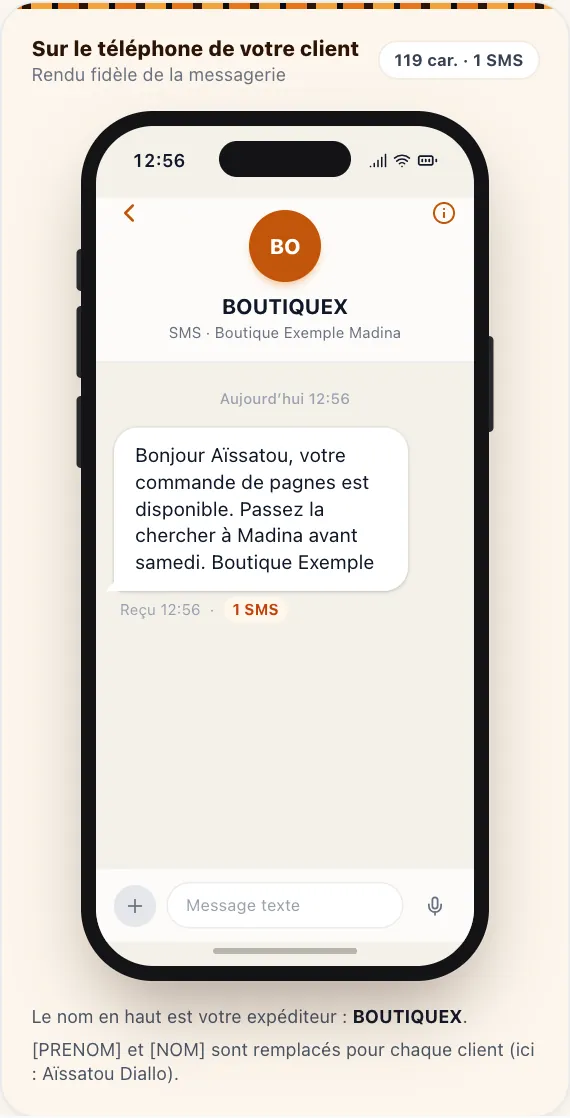
If your contacts have a first name on file, include it in the message: the platform will substitute it for each recipient. “Hello, Aïssatou” instead of “Hello, dear customer”—the message will seem personalized for her.
Get help with writing
If you’re short on ideas, the writing assistant suggests three messages that fit into a single text message based on just a few words (“braid sale Saturday”). You choose, you edit—you’re in control.
Step 3: Choose the recipients
Sending messages to everyone isn't always the best idea. A promotion on school uniforms is of interest to parents, not suppliers.
Tags
Organize your contacts using labels: “loyal customers,” “new customers,” “Kipé,” “Lambanyi.” When sending a message, you can select one or more labels. Only the contacts with those labels will receive the message.
One-time groups
For a single message (a reminder to ten customers who made reservations on Saturday), you can also select contacts one by one or paste their numbers directly.
For sending messages to hundreds or thousands of people, read our guide onBulk SMS messaging in Guinea.
Step 4: Choose the time
Now or Later
You can send a message right away or schedule it for a specific date and time. For example: on Thursday evening, you prepare Saturday’s promotional message and schedule it for 8 a.m. on Saturday. You don’t have to think about it anymore. Everything is explained in Schedule your SMS campaigns.
Times to Avoid
Avoid sending messages at night, very early in the morning, and during prayer times. During Ramadan, adjust your schedule to match your customers’ routines. A message received at the right time gets read; the same message received at 11 p.m. gets deleted in frustration.
Step 5: Verify, send, track
Preview before sending
Before confirming, the screen displays a summary: number of recipients, number of SMS credits used per message, total amount deducted from your balance, and a preview of the message as it will appear to the recipient. Take ten seconds to double-check: a pricing error sent to 300 customers cannot be undone.
Sender's name
The name that appears at the top of the text message makes a real difference in building trust. “SALONKIPE” is instantly recognizable. See our article on the SMS sender name.
Delivery Report
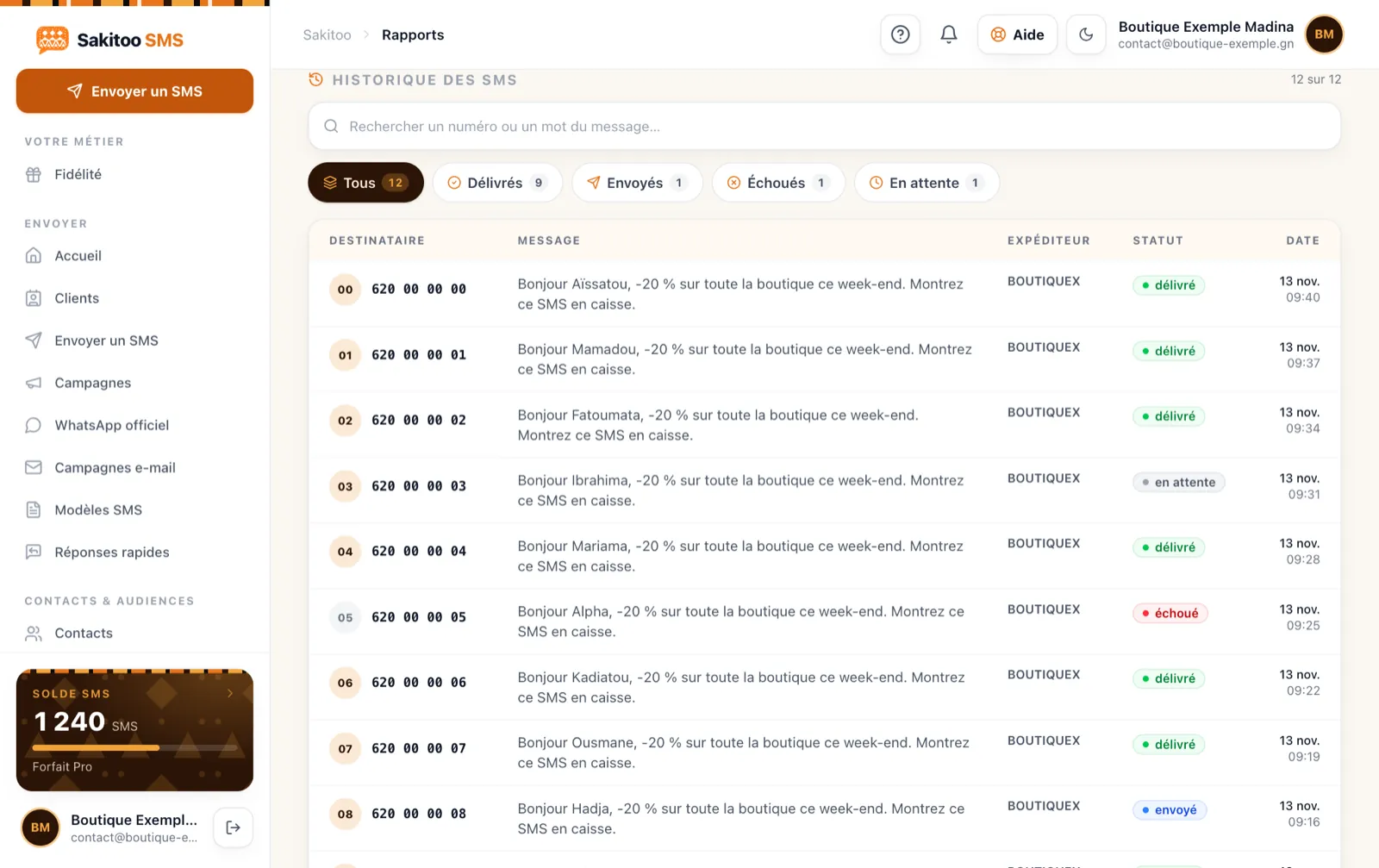
After sending, the Reports page shows for each number whether the text message was delivered, is pending (phone turned off, out of range), or failed (number does not exist). Remove the failed numbers from your list: you will no longer be charged for them.
The most common mistakes
| Error | Consequence | How to avoid it |
|---|---|---|
| Incorrectly entered numbers | Paid SMS messages that were never received | Let the import run, correct any errors, and remove failed entries |
| Message too long | Two or three SMS messages charged per contact | Monitor usage, cancel plans |
| Sent at 10 p.m. | Misinterpreted message, unsubscriptions | Schedule for the morning |
| No sender name | Caution: Message ignored | Request a name for your brand |
| Send to Everyone | Message not relevant to some contacts | Use tags |
| Purchased list | Complaints, negative image | Send messages only to your own contacts |
How much does it cost?
You pay for the text messages you send, in bundles, with no subscription required. SMS messages never expire.
| Package | SMS | Prices |
|---|---|---|
| Explore | 50 | 12,500 GNF |
| Starter | 200 | 42,000 GNF |
| Pro | 1 000 | 205,000 GNF |
| Business | 5 000 | 1,025,000 GNF |
| Business | 20 000 | based on a quote |
Sample calculation: Fatoumata sends a promotional text message to her 180 customers. She uses 180 text messages. With the Starter package (200 SMS for 42,000 GNF), she has 20 SMS left for appointment reminders. If her message were 200 characters long, it would count as 2 SMS per customer, for a total of 360 SMS—which is why the counter is so useful.
The sender name is free with the Pro plan (1,000 SMS) or a business plan; otherwise, your SMS messages will be sent with the default sender. Prices verified on 11/13/2026, see /pricing. Details on pricing by industry are available at How much does an SMS cost in Guinea?.
And when you send messages frequently
Once you’ve got the hang of sending messages, you’ll notice that many of them are repetitive: birthdays, appointment reminders, payment reminders. These messages can be sent automatically at the right time, thanks to the automations. Schools, clinics, and businesses also havebusiness tools Ready to use.
Three sample messages to customize
To get started, here are three short templates provided as examples. Replace the text in square brackets with your own.
Advertisement : “Hello [first name], new shipment of [product] arriving today in [neighborhood]. Come early—quantities are limited.” This message is used by stores, warehouses, and markets.
Reminder : “Hello [first name], we’ll be expecting you tomorrow at [time] for your appointment. If you can’t make it, please let us know at [number].” It’s ideal for salons, medical offices, auto shops, and repair shops.
Information : “Dear parents, the school will be closed on Monday [date] for the holiday. Classes resume on Tuesday at 8 a.m.” For schools, organizations, and government agencies.
Everyone can fit a message into a single text if you keep the wording simple. Save your recurring messages as templates: next time, all you’ll need to do is select them and change the date. You’ll save time and maintain a consistent tone—something your customers will notice.
Reply to comments
A well-crafted text message often generates a response: phone calls, visits, or WhatsApp messages. Make sure someone is available to respond on the day the message is sent. Nothing is more frustrating for a customer than responding to an ad and not being able to reach anyone.
Beginner Mistakes to Avoid
It’s the first few messages you send where you’re most likely to make mistakes. It’s no big deal if you know the pitfalls.
- Text just like on WhatsApp. Abbreviations and emojis make the message seem less professional, and certain special characters can cause the message to count as multiple text messages. Keep your writing simple, using short sentences.
- Forgot to mention who wrote this. Without a sender name or signature, the recipient won’t know where the message is coming from. End the message with your organization’s name, or use a sender name.
- Forget the expected action. What does the person need to do? Visit the store, call, pay, confirm? Explain it in one sentence.
- Enter the numbers manually without verifying them. One extra digit and the message won’t go through. Instead, import your file or contact list: the platform will identify any incomplete numbers.
- Send an important message right away without a test message. Send it to yourself first.
Who Sends What? A Few Ideas by Industry
Example: A bakery in Kipé confirms each cake order and reminds customers of the pickup time. Example: A law firm informs a client of the court date. Example: A auto repair shop in Matoto notifies a customer that their vehicle is ready. Example: A school announces the date for report cards. In each case, a single message saves multiple phone calls.
Your one-minute checklist
- Account created and balance topped up.
- Imported and verified phone numbers.
- A short, signed message with a clear call to action.
- Try it out on your own phone.
- Send messages immediately or schedule them for a reasonable time.
Frequently Asked Questions
Can you send messages from a computer? Yes, from sakitoosms.com, to all networks in Guinea: Orange, MTN, and Cellcom.
What number format should I use? 9 digits after +224; common formatting errors are automatically corrected.
How many characters? 160 per standard SMS; the counter displays the number of SMS messages used.
How do I know if it went through? The reports show the status of each number.
Is my personal number visible? No, it's the sender's name that appears.
Now it's your turn
Every message you don’t send because “it takes too long” is a missed opportunity: a customer who doesn’t return, a parent who isn’t informed, a forgotten appointment. Create your account, import your contacts, and send your first message in just a few minutes. The illustrated user guide is available at How it works.
Frequently Asked Questions
Can you send a text message in Guinea from a computer?
Yes. On sakitoosms.com, you can compose messages on your computer, and the text messages are sent to your contacts’ phones on all networks in Guinea: Orange, MTN, and Cellcom.
What number format should I use?
A Guinean mobile number consists of 9 digits following the country code +224. The platform recognizes numbers entered with or without +224, with or without spaces, and flags any that are incomplete.
How many characters are in an SMS?
160 characters for a single text message. If the message exceeds this limit or contains certain special characters, it will count as multiple text messages. The counter will show you this before you send it.
How do I know if my text message was delivered?
The reports show the status of each number: delivered, pending, or failed.
Is my personal number visible?
No. The recipient will see your company’s sender name, if you have one, or the platform’s default sender name.