OTP SMS in Guinea: Secure Your Customer Accounts
OTP SMS in Guinea: Secure Your Customer Accounts
You’ve launched a delivery app in Conakry, an online store, a course platform, or a payment service. Every day, people create accounts using a phone number. But is that number really theirs? Without verification, you won’t know. TheOTP SMS in Guinea It answers this question in just a few seconds: a one-time code is sent to the phone, the person enters it, and you have proof that the number belongs to them.
This article explains, in plain language, what an OTP code is, why it’s so important for a Guinean business, what risks you face without it, and how to set it up with Sakitoo SMS.
In pictures
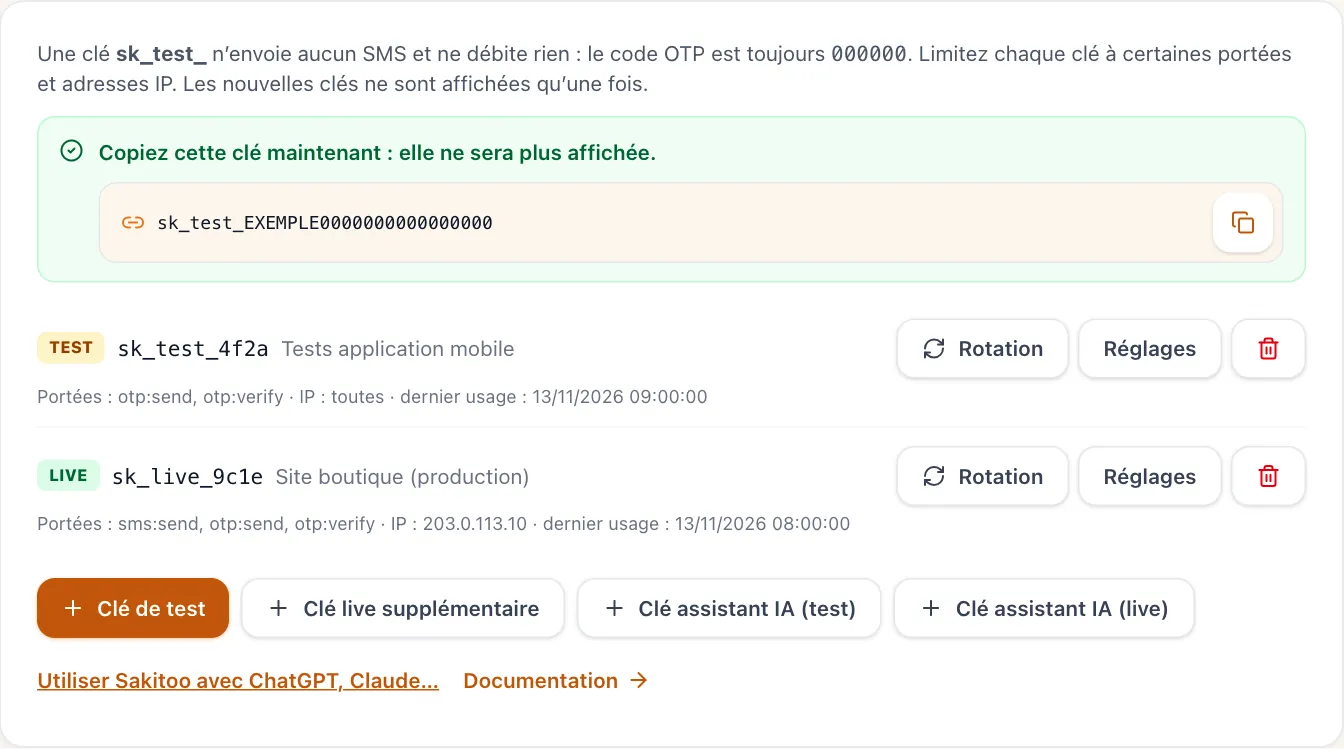
Table of Contents
- What is an OTP code?
- What You're Missing Without SMS Verification
- Practical Applications of OTP in Guinea
- Why SMS rather than another channel?
- Built-in safeguards at Sakitoo SMS
- Setting Up OTP: The Steps
- How much does it cost?
- Best practices for a well-received code
- Frequently Asked Questions
What is an OTP code?
OTP stands for “One Time Password.” It is a short code, usually 6 digits long, that is valid only once and for a short period of time.
The concept is simple:
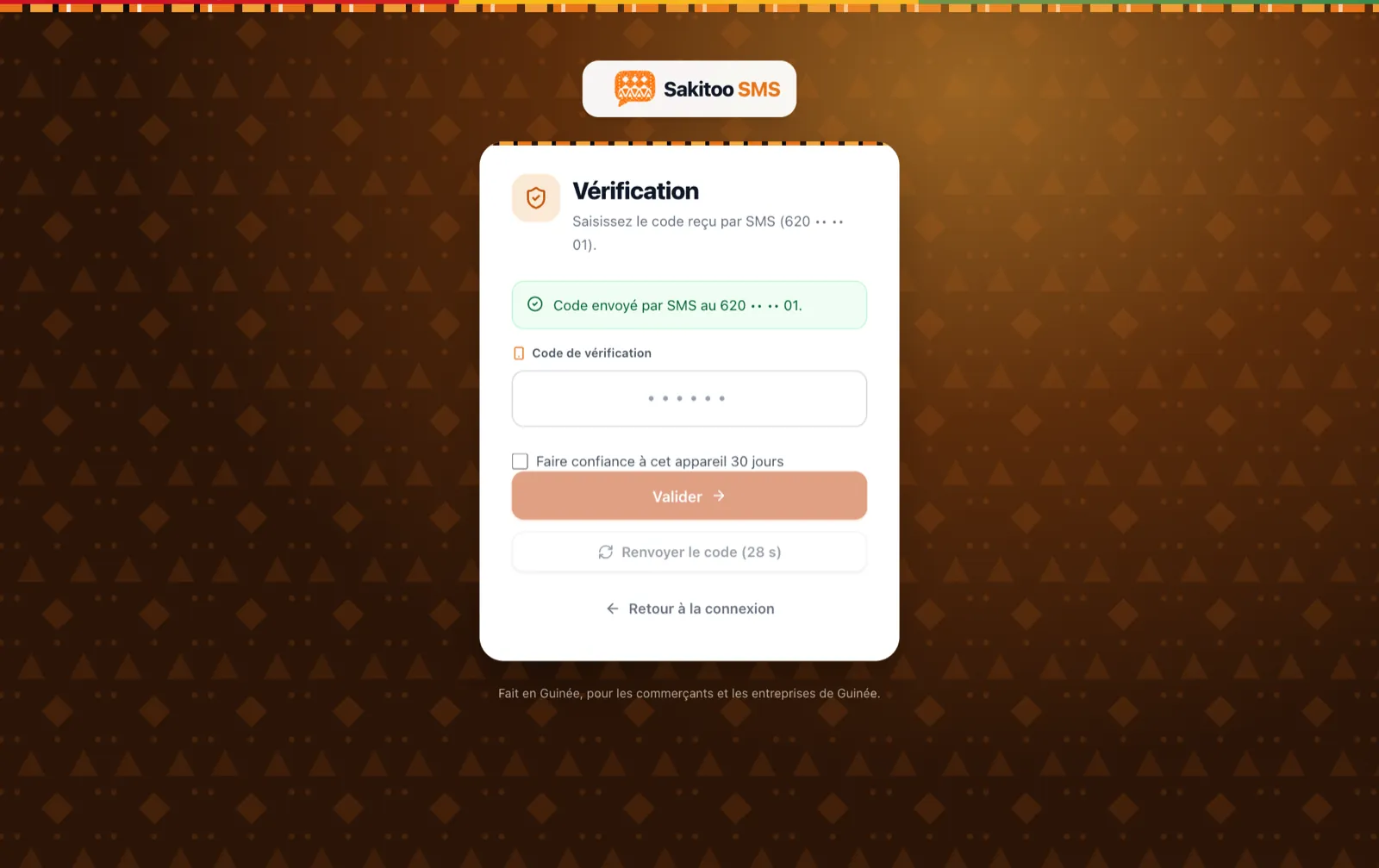
- The user enters their number on your website or app.
- Your service is asking Sakitoo SMS to send a code to this number.
- The text message arrives with your company’s name as the sender.
- The person enters the code into your app.
- If the code is correct and still valid, the number is confirmed.
The code is useless once it has been used or has expired. Even if someone sees it over your shoulder ten minutes later, they can no longer use it.
OTP, two-factor authentication, verification code: all the same concept
You’ll come across several terms: “verification code,” “confirmation code,” “two-factor authentication,” and “2FA.” They all refer to the same concept: adding proof of phone ownership to what the person already knows (their password and username). SMS is the most common method because everyone has a phone that can receive text messages, whether it’s a smartphone or not.
What You're Missing Without SMS Verification
Many startups put off verifying their phone numbers “until later.” It’s understandable—there’s so much to do. But failing to verify your number can be costly, often without you realizing it right away.
Fake accounts that distort everything
Without OTP verification, anyone can sign up using any number: a made-up number, a neighbor’s number, or a number entered incorrectly. The result: your customer database fills up with unusable contacts. Your welcome texts, promotions, and order confirmations go to waste. You’re paying for messages that never reach anyone.
Phantom orders
Example: An online store in Kaloum offers cash-on-delivery payment. A customer places an order using a fake phone number. The delivery person travels across town, but no one answers. Time, fuel, and the tied-up merchandise are all wasted. A simple verification of the phone number before confirming the order would have prevented this wasted trip.
Stolen accounts and damaged trust
If your app handles money, loyalty points, or personal data, a password alone isn’t enough. Passwords can be guessed, shared, or written down on a piece of paper. When an account is hacked, the customer doesn’t blame the hacker—they blame your service. A code sent to their phone during sensitive transactions makes theft much more difficult.
Overwhelmed customer service
“I forgot my password,” “I can’t access my account anymore”: without a reliable way to verify identity, your team has to check manually, by phone or text message. OTP enables self-service password reset: the customer receives a code, enters it, and chooses a new password. Your team can focus on other tasks.
Practical Applications of OTP in Guinea
OTP isn't just for banks. Here are some common scenarios, presented as examples.
Sign up for an app
Example: A motorcycle taxi booking app in Ratoma requires a code for each new registration. Drivers know that the customer placing the order can be reached.
Secure login
Example: A management platform for merchants in Madina sends a code when a user logs in from a new phone. If it’s not the user, they are alerted immediately.
Payment or withdrawal confirmation
Example: A microfinance institution in Kindia requires a code before confirming a change to a repayment number. No one can tamper with repayment schedules without having the member’s phone in hand. If you work in this sector, be sure to read our article on SMS for microfinance and tontines.
Password Reset
This is the most common method. The code replaces the link sent by email, which many of your customers don’t check.
Order or delivery confirmation
Example: A delivery service will only hand over the package once the recipient provides the code received via text message. This gives the delivery person proof that the correct recipient has indeed received the package.
Voting, event registration, surveys
Example: A student association in Labé is organizing an online internal election. A unique code assigned to each phone number prevents the same person from voting more than once.
Why SMS rather than another channel?
Other options are available: authentication apps, email, and messaging services. Each has its place, but SMS still offers several advantages for the Guinean public.
| Criterion | SMS | Authentication app | |
|---|---|---|---|
| Works on a basic phone | Yes | No | No |
| Requires an internet connection at the customer's location | No | Yes | No to read the code, yes to install it |
| The customer must install something | No | No, but you need an address | Yes |
| Direct link to the phone number | Yes | No | No |
| Public Habits | Widely used | Variable | Low |
SMS is therefore the channel that excludes the fewest people. A customer who has neither mobile data nor an email address will still receive their code. And since the OTP is specifically used to verify a phone number, it makes sense to send it… to that number.
All networks, no exceptions
Your customers are spread across all networks in Guinea: Orange, MTN, and Cellcom. With Sakitoo SMS, you don’t need to know which number belongs to which network—you send the message, and the code arrives. To learn more about this, check out our article Orange, MTN, Cellcom: reach all networks.
Built-in safeguards at Sakitoo SMS
A good OTP system does more than just send a code; it must also be resistant to abuse. Here are the default rules applied to the Sakitoo SMS OTP API.
A short but robust code
- 6 digits : short enough to be typed out without errors, long enough not to be guessed at random.
- Valid for 5 minutes : just enough time to receive it and type it in—no more.
- Maximum of 5 trials : After that, the code is blocked, and you’ll need to request a new one.
Protection against bulk messaging
Malicious individuals may attempt to send hundreds of codes to a single number, either to harass someone or to drain your balance. Limits are therefore in place: a maximum number of codes per number within a short period, a minimum waiting period before requesting another code, and a temporary block after too many failed attempts on the same number.
Test keys and production keys
Your developer starts with a trial key : It builds and tests the entire workflow without deducting from your balance or sending actual text messages. Once the workflow is ready, it switches to the actual key. Keys are protected and can be restricted to specific server addresses and actions. If a key is compromised, you can deactivate it and create a new one.
Clear usage limits
The API supports up to 60 requests per minute and 5,000 per day per account. For most applications in Guinea, this is more than enough. If your volume exceeds these limits, please contact us to discuss your needs.
Your company name on the text message
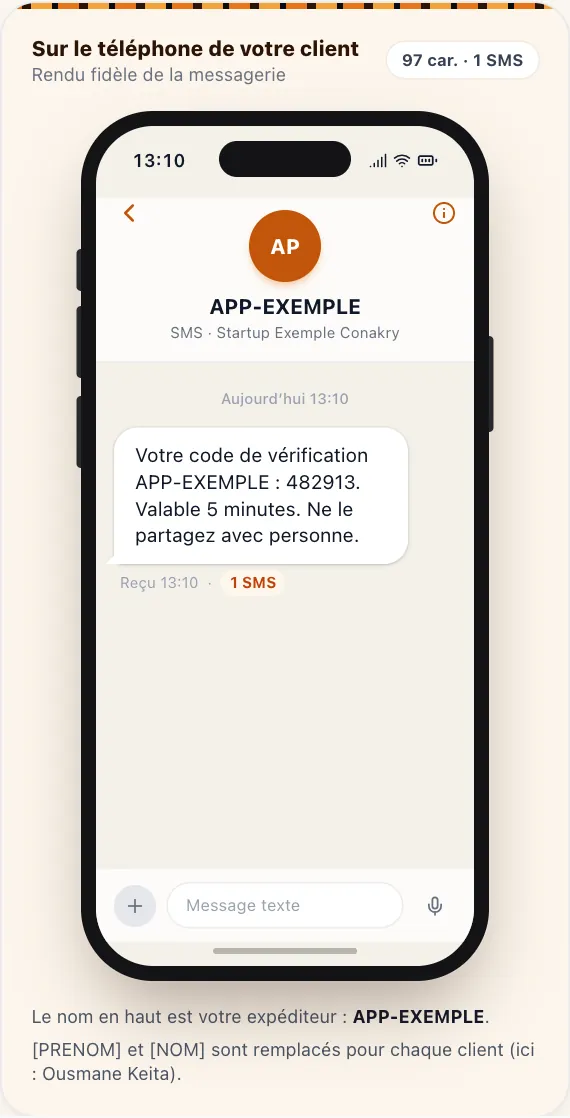
A code from an unknown number is cause for concern. A code signed “MONAPPLI” is reassuring. The Sender's name It’s all about trust: the customer recognizes your service and doesn’t suspect a scam.
Setting Up OTP: The Steps
You don’t need to understand the technical details to manage the project. Here are the steps, from the manager’s perspective.
1. Create your account
Sign up at sakitoosms.com. Registration is free. You can access your account and the page Developers.
2. Create a test key
From the Developers section, you can create a test key and send it to the person developing your website or app. The documentation is available in French, with examples ready to be adapted.
3. Define the customer journey
Work with your developer to decide when the code is required: only upon registration? Every time a user logs in from a new phone? Before each payment? Fewer codes mean less friction; more codes mean greater security. The right balance depends on what you’re protecting.
4. Compose the message
The text of the SMS should be clear and concise. For example:
Your MONAPPLI code: 482913. Valid for 5 minutes. Do not share it with anyone.
The warning “Do not share this with anyone” is important: many scams involve calling the victim while posing as customer service and asking for “the code you just received.”
5. Test, then go live
Your developer checks all scenarios: valid code, invalid code, expired code, and code requested too soon. Then, you top up your balance and switch to the live key.
6. Track messages
In your account, you can view your messages, their status, and your usage. If something seems unusual (such as a large number of messages sent to international numbers, for example), you’ll spot it right away.
For an overview of the API—beyond OTP (order notifications, alerts, reminders)—read Integrating an SMS API in Guinea.
How much does it cost?
Each OTP code sent counts as one SMS and is deducted from your balance. There is no mandatory subscription required to use the API. The cost therefore depends on the package you purchase. Prices verified on 11/13/2026; see /pricing For the current pricing table.
| Package | SMS | Prices | Price per code |
|---|---|---|---|
| Explore | 50 | 12,500 GNF | 250 GNF |
| Starter | 200 | 42,000 GNF | 210 GNF |
| Pro | 1 000 | 205,000 GNF | 205 GNF |
| Business | 5 000 | 1,025,000 GNF | 205 GNF |
| Business | 20 000 | based on a quote | based on a quote |
Purchased text messages do not expire: even if your app gets off to a slow start, you won’t lose anything.
A simple calculation
Example: Your app has 300 new sign-ups per month, and each new user requests an average of one and a half codes (some request them multiple times). That comes to about 450 codes per month. With the Pro plan, that comes to just over 92,000 GNF per month. Compare that to the cost of a single lost delivery, a single hacked account, or one hour of manual verification by your team.
Sender's name
Registering a sender name is free starting with the Pro plan (1,000 SMS). For an app that sends codes, this is practically essential.
Lower costs without compromising security
- Keep your message short so it fits in a single text message: a long message counts as multiple text messages.
- Don't send a code every time the app is opened; save it for when it really matters.
- Set a waiting period before a user can request a code again (this feature is already built into Sakitoo SMS).
Best practices for a well-received code
Check the number format before sending
A Guinean phone number entered incorrectly (one digit too many, the country code +224 omitted or duplicated) will never receive its code. Ask your developer to validate the format as it is entered and to display the number to the customer for confirmation.
Display a countdown timer
Let the customer know how much time they have left and when they can request a new code. This prevents them from clicking “Resend” ten times.
Set up a help message
If the code doesn't arrive, suggest: checking the number, making sure the phone has a signal, waiting a few seconds, and then trying again. Add a contact (WhatsApp or phone number) for cases where the process is stuck.
Never ask for the code over the phone
Train your team: no one at your company should ask a customer for the code they received. Be sure to tell your customers this as well, both in the text message and on your website.
Keep track
Keep a record of the date and time the number was verified. In the event of a dispute (“I didn’t place that order”), you’ll know when and how the number was confirmed.
Frequently Asked Questions
What is an OTP code? A one-time code sent via text message, which verifies that the person is the owner of the provided number. At Sakitoo SMS, the code consists of 6 digits and remains valid for 5 minutes.
Does the code work on all networks? Yes, to all networks in Guinea: Orange, MTN, and Cellcom.
How much does a code cost? The price per SMS in your plan: 250 GNF with the Discovery plan, 205 GNF with the Pro and Business plans (prices as of November 13, 2026).
What happens in the event of repeated attempts? The code is locked after 5 attempts and expires after 5 minutes. Limits per number also prevent bulk messaging.
Do you need a developer? Yes, for the initial setup on your website or app. After that, everything is automated.
Take action
Every day that verification isn’t performed, there are more fake accounts, orders that can’t be delivered, and customers at risk of having their accounts hacked. SMS OTP solves this problem for just a few dozen GNF per registration, on all networks nationwide.
Create your account for free, generate a test key from the Developers page, and send it to your developer today. To understand how the platform works in general, see also How it works.
Frequently Asked Questions
What is an OTP code?
This is a one-time code sent via text message to the person’s phone number, which they must enter to verify that the number belongs to them. At Sakitoo SMS, the code consists of 6 digits and remains valid for 5 minutes.
Does the OTP code arrive on all Guinean networks?
Yes, the codes are sent to all networks in Guinea—Orange, MTN, and Cellcom—without you having to sort the numbers.
How much does an OTP via SMS cost?
Each code sent counts as one SMS and is deducted from your balance at the rate specified in your plan. For example, with the Pro plan (1,000 SMS for 205,000 GNF), each code costs 205 GNF. Prices verified on 11/13/2026 at /tarifs.
What happens if someone tries to guess the code?
The number of attempts is limited to 5 per code, and the code expires after 5 minutes. After that, you must request a new one.
Do you need to be a developer to use OTP?
The person building your website or app integrates the API once. After that, everything happens automatically; you can track your messages in your account.