Link for Mobile Money payments via SMS in Guinea
Mobile Money payment link: collect payments remotely with a single text message
A customer asks you to hold a dress for them until Saturday. A mother needs to pay for her child’s school lunch but can’t stop by the school until the end of the month. A customer in Kankan orders spare parts from your store in Conakry. In all three cases, the same question arises: how can you get paid without the person having to come in person? The Mobile Money payment link The customer responds via text message. You specify an amount, the customer receives a message with a link, pays from their phone, and you see the money come in.
This article explains how Sakitoo SMS’s link-based payment collection works, its practical applications, its exact cost, and best practices for building trust.
In pictures
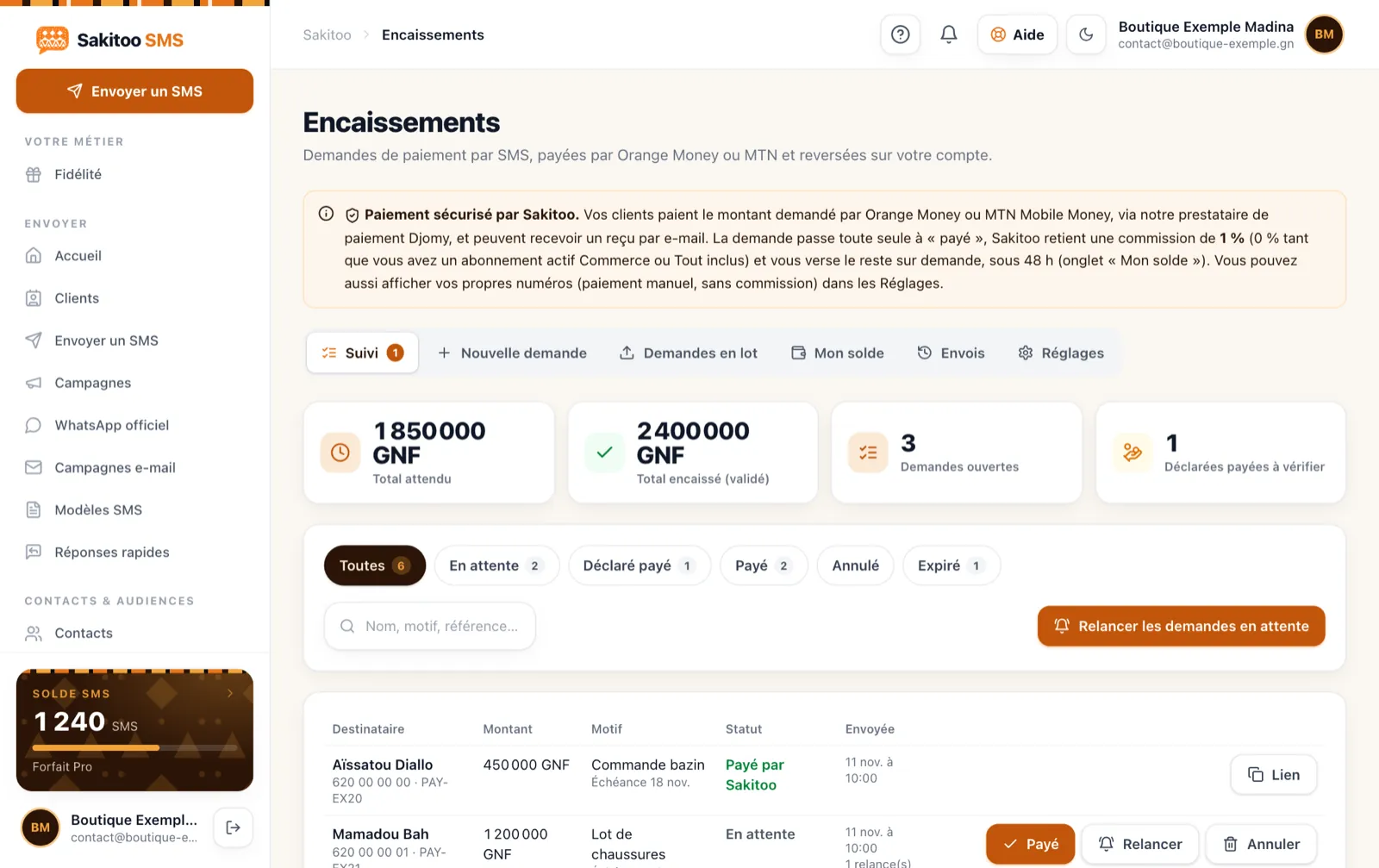
Table of Contents
- What You Miss Out On Without Remote Payment
- How the payment link works
- Uses by Industry
- Building trust: customers need to know who is messaging them
- Feel free to follow up
- How much does it cost?
- Compare payment methods
- Get Started
What You Miss Out On Without Remote Payment
Failed sales
“I’ll stop by tomorrow to pay”: how many times has that promise gone unfulfilled? Between the moment a customer decides to buy and the time they actually visit the store, they may change their mind, find what they want elsewhere, or simply forget. Every day you wait is another chance to lose the sale.
The time spent providing one’s merchant number
Sending your merchant number via WhatsApp, waiting for a screenshot of the transfer, verifying that the amount is correct, and asking for the sender’s name to find out who paid: this process is time-consuming and prone to errors.
Payments that cannot be reconciled
Three transfers of 150,000 GNF arrive on the same day. Which one corresponds to which order? Without a clear reference, bookkeeping becomes a headache, and customers end up being billed again even though they’ve already paid.
Money Left Out in the Open
For a school, an organization, or a service provider, outstanding payments put a strain on cash flow. The simpler the payment process, the faster the payment is received.
How the payment link works
On your end
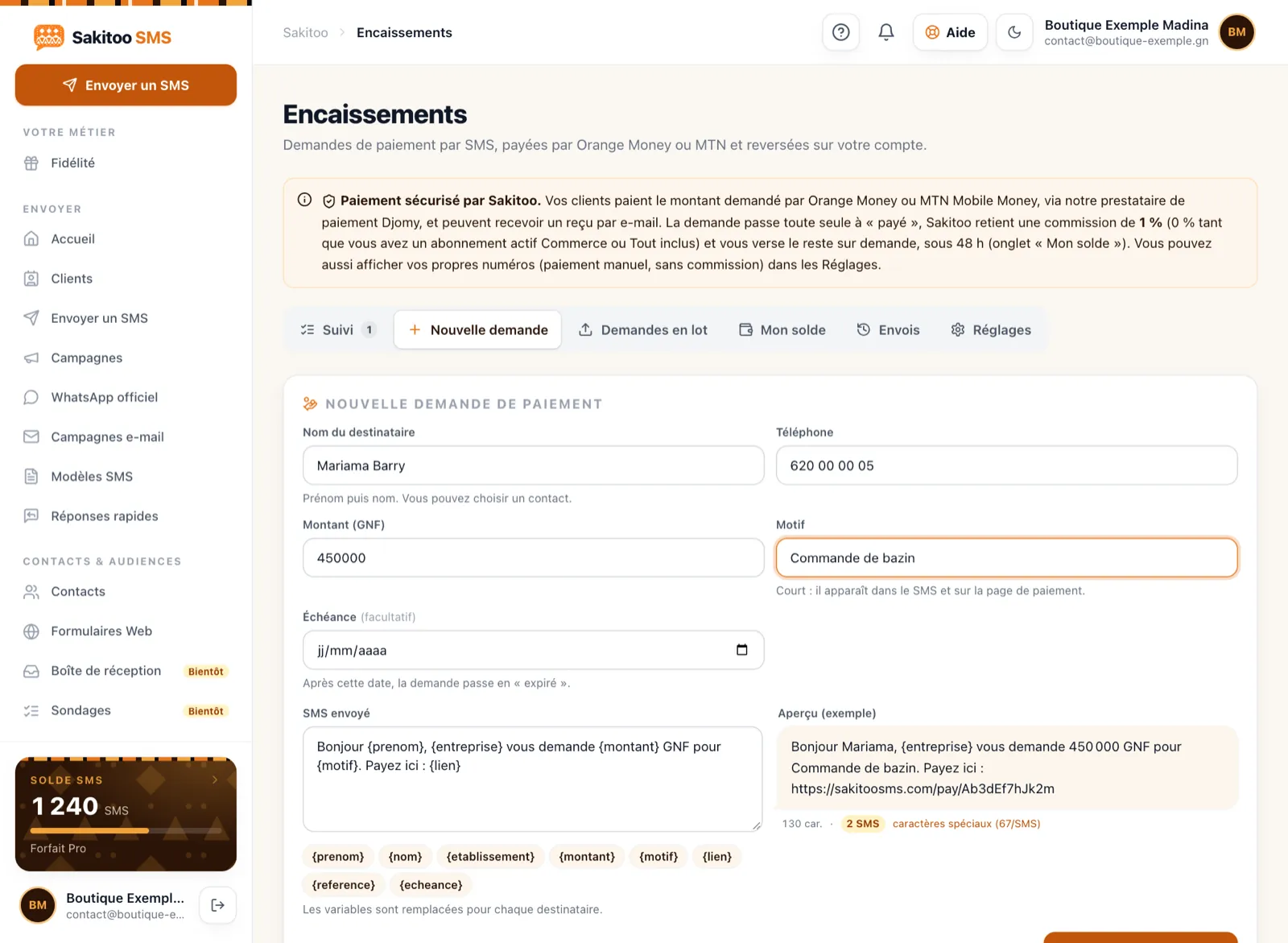
- In your account, open the billing tool and create a request: amount, reason (“wedding dress deposit,” “November cafeteria”), customer.
- The request generates a payment link in your name.
- Send it to the customer via text message with just one click. You can also share it in other ways if you’d like.
- You can track the status: pending, paid.
- Once payment is confirmed, you send a receipt via text message.
Customer Portal
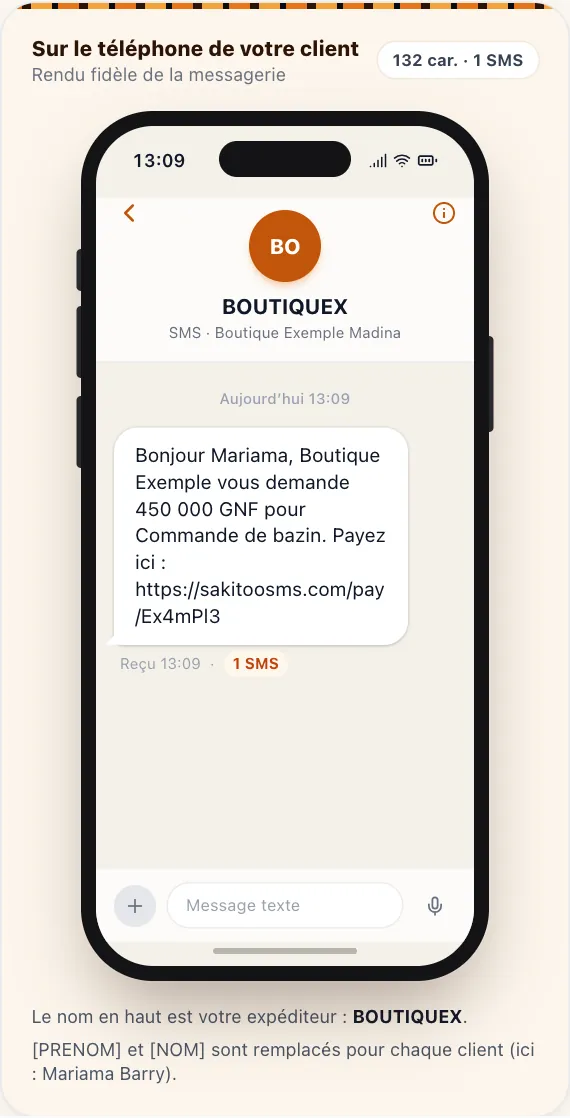
- They will receive an SMS signed with your name, including the amount and the link.
- He opens the link on his phone.
- It displays your name, the reason for the payment, and the amount.
- He pays using his mobile money account.
- He receives the confirmation.
Customers don’t need to install anything. All they need is a phone capable of opening a link and a mobile money account.
Bulk Requests
For identical amounts sent to multiple people (membership fees, registration fees, event admission fees), you create a single request for an entire batch. Each recipient receives their own link, and each payment is tracked individually.
Automatic billing
With the Commerce and All-Inclusive plans, once activated, you can process payments using your own payment keys, with no commission charged by Sakitoo. This is useful for organizations that regularly process large volumes of payments.
Uses by Industry
The following situations are examples.
Shop and Tailoring
Example: “Hello Kadiatou, here is the link to pay the deposit for your wedding dress (300,000 GNF): [link]. Thank you. Bah Couture, Madina.”
Once the deposit is received, the order is confirmed. No more fabric cut for a customer who won’t be coming back.
Distance selling
A customer in Labé places an order on your Facebook page. You send them a link showing the total amount, including shipping. Once payment is received, you ship the order. The tracking information can then be sent via text message; see Our article on customer loyalty and package tracking.
School
Example: “Dear parents, the November cafeteria fees (150,000 GNF) can be paid here: [link]. Les Palmiers School District.”
Combined with payment reminders, the link saves parents from having to travel to make payments. The entire school system is presented in Our article on text messaging for schools.
Clinic and laboratory
Payment of a deposit for a remote consultation, or payment for an exam before picking up the results.
Tontine, savings fund, and association
Monthly membership fee, sign-up fee, event registration fee. See Our article on microfinance and tontines.
Service provider
Electrician, plumber, trainer, consultant: Send the link at the end of the job, or a link for a deposit before you head out.
Pastry Shop and Catering Service
Deposit for a birthday cake or wedding order. Payment confirms your order, so you can purchase the ingredients risk-free.
Building trust: customers need to know who is messaging them
Mobile money scams do exist, and your customers know it. Your payment request must be immediately recognizable.
Sender's name
An SMS that displays “BAHCOUTURE” instead of an unknown number makes all the difference. The customer recognizes your name even before reading the message. The sender name is free with the Pro plan (1,000 SMS). See Our article on the SMS sender name.
A clear message
- The customer's first name.
- The exact reason (“wedding deposit”).
- The amount.
- Your name and, if applicable, your neighborhood.
A customer who recognizes their own order pays without hesitation.
Safety reminders to share with your customers
- You will never ask them for their mobile money PIN.
- They must verify the name on the payment page before confirming.
- If they have any questions, they can call you at the number they have on file.
Tell your regular customers this just once: it builds trust in your future relationship.
Feel free to follow up
An unclicked link doesn't necessarily mean a rejection. Often, the customer simply read the message at the wrong time.
A simple reminder
Example: “Hello Kadiatou, just a reminder about the deposit for your outfit (300,000 GNF): [link]. Your fitting appointment is on Thursday.”
The Right Pace
- Same day or the next day if it's urgent.
- Two or three days later for a non-urgent payment.
- A final, polite reminder before canceling the reservation.
To create a complete follow-up sequence, read Our guide to collecting overdue payments via SMS. The automations They can send these reminders on your behalf.
How much does it cost?
Prices shown on The Pricing Page, verified on 11/13/2026. Please check them before placing an order.
Payment fees
- 2.5% per payment received, including mobile payment fees.
- With annual payment, the plans offer 10 months of service for the price of 12.
Calculation example: A down payment of 300,000 GNF paid via a link incurs a commission of 7,500 GNF at a rate of 2.5%.
Text Messages
The text message containing the link is a standard text message and will be deducted from your balance.
| Package | SMS | Prices | Price per SMS |
|---|---|---|---|
| Explore | 50 | 12,500 GNF | 250 GNF |
| Starter | 200 | 42,000 GNF | 210 GNF |
| Pro | 1 000 | 205,000 GNF | 205 GNF |
| Business | 5 000 | 1,025,000 GNF | 205 GNF |
| Business | 20 000 | based on a quote | based on a quote |
SMS messages never expire. A long message counts as multiple SMS messages; the counter displays this before the message is sent.
When should you switch to the Business plan?
Do the math: the Commerce plan includes over 300 SMS messages each month, plus tools for customer loyalty, package tracking, and abandoned carts.
Compare payment methods
| Method | What Works | What's the problem? |
|---|---|---|
| Cash payment in-store | Simple, instant | The customer must come in person |
| Merchant number sent via text message | No setup required | Difficult to reconcile, risk of amount errors |
| Link for payment via SMS | Amount and specific reason, tracking status, receipt | 2.5% commission |
| Bank transfer | Suitable for large volumes and businesses | Delivery times; not well suited for individual users |
No single method can replace all the others. The payment link is especially useful for down payments, online sales, membership dues, and payment reminders.
Get Started
1. Create an account
Sign up at the sign-up page. The general operation is explained at How it works.
2. Complete your profile
Your organization’s information—including its name and business activity—appears on the payment page. This information is important for building trust.
3. Run an initial test
Create a small payment request and pay it yourself. You’ll see exactly what your customer sees.
4. Start with a use case
Deposits or reminders for overdue payments. Once you’re comfortable with it, expand to other uses. The list of available tools is on the page Tools.
Terms of Use
- Send links only to customers with whom you have an actual relationship.
- One link per reason: do not combine multiple purchases in a single request without specifying them.
- Always send a receipt once payment has been received.
- Keep your payment receipts for your accounting records.
Write a payment request that makes people want to pay
The text of the SMS matters. A blunt request (“Pay 300,000 GNF: [link]”) raises concerns; a clear request is reassuring.
The Four Essential Elements
- Written by : Your organization’s name, in the sender field and in the message text.
- What is it for? : the specific reason, in the customer’s own words (“your wedding outfit,” not “order 77”).
- How much : the exact amount, in GNF.
- When : a deadline, if applicable (“by Thursday to keep the reservation”).
Before and after
Unclear example: “Payment 300,000 [link]”
Clear example: “Hello Kadiatou, here is the link for the down payment on your wedding dress (300,000 GNF), due by Thursday: [link]. Bah Couture, Madina.”
The second message is longer, but it still fits into one or two text messages and answers all of the customer’s questions before they even ask them.
Good to know. Always include the reason and the amount in the text message, and sign it with your organization’s name: customers are more willing to pay when they know exactly what they’re paying for.
The receipt: the small step that makes all the difference
Many merchants forget to confirm payment. Yet customers who have just paid remotely are always wondering whether the money has actually been received. A receipt text message, sent as soon as the status changes to “paid,” immediately reassures them and prevents them from having to call.
Example: “Thank you, Kadiatou. We have received your deposit of 300,000 GNF. See you Thursday for the fitting. Bah Couture.”
This receipt also serves as written proof for both the customer and you in case of any future disputes regarding what was paid.
Conclusion: Charge the customer the moment they say yes
The best time to collect payment is when the customer has made up their mind. The SMS payment link lets you capitalize on that moment, no matter where the customer is in Guinea or which network they use: all networks in Guinea—Orange, MTN, and Cellcom—receive your SMS messages. No more screenshots of transfers or “I’ll pay tomorrow” excuses.
Create your account and send your first payment request today.
Frequently Asked Questions
Does my customer need to install an app to pay?
No. He receives a text message with a link, opens it on his phone, and pays using his mobile money account, just as he usually does.
How much does it cost to collect payment via a link?
A 2.5% commission per payment received, including mobile payment fees. Prices verified on 11/13/2026.
How can I tell if the customer has paid?
Each request has a status in your account. Once payment is confirmed, the status changes, and you can send a receipt via SMS.
Can I send the same request to multiple customers?
Yes, for example, for identical membership dues or registration fees. Each customer receives their own link, and each payment is tracked separately.
Is the payment link secure for my customer?
The link takes you to Sakitoo’s payment page, which is branded with your organization’s name. Advise your customers to check the sender’s name on the text message and never to share their mobile money PIN with anyone.