App for sending text messages in Guinea: Sakitoo SMS
App for sending text messages in Guinea: Sakitoo SMS on Android
Are you looking for a App for sending text messages in Guinea Want to reach your customers without being tied to a computer? The Android app Sakitoo SMS Puts the platform right in your pocket: you can write a message from a store, a construction site, a schoolyard, or a taxi, and it’s sent to dozens or hundreds of contacts, signed with your company’s name. This article explains how the app changes your day, what it can do, and what it can’t do.
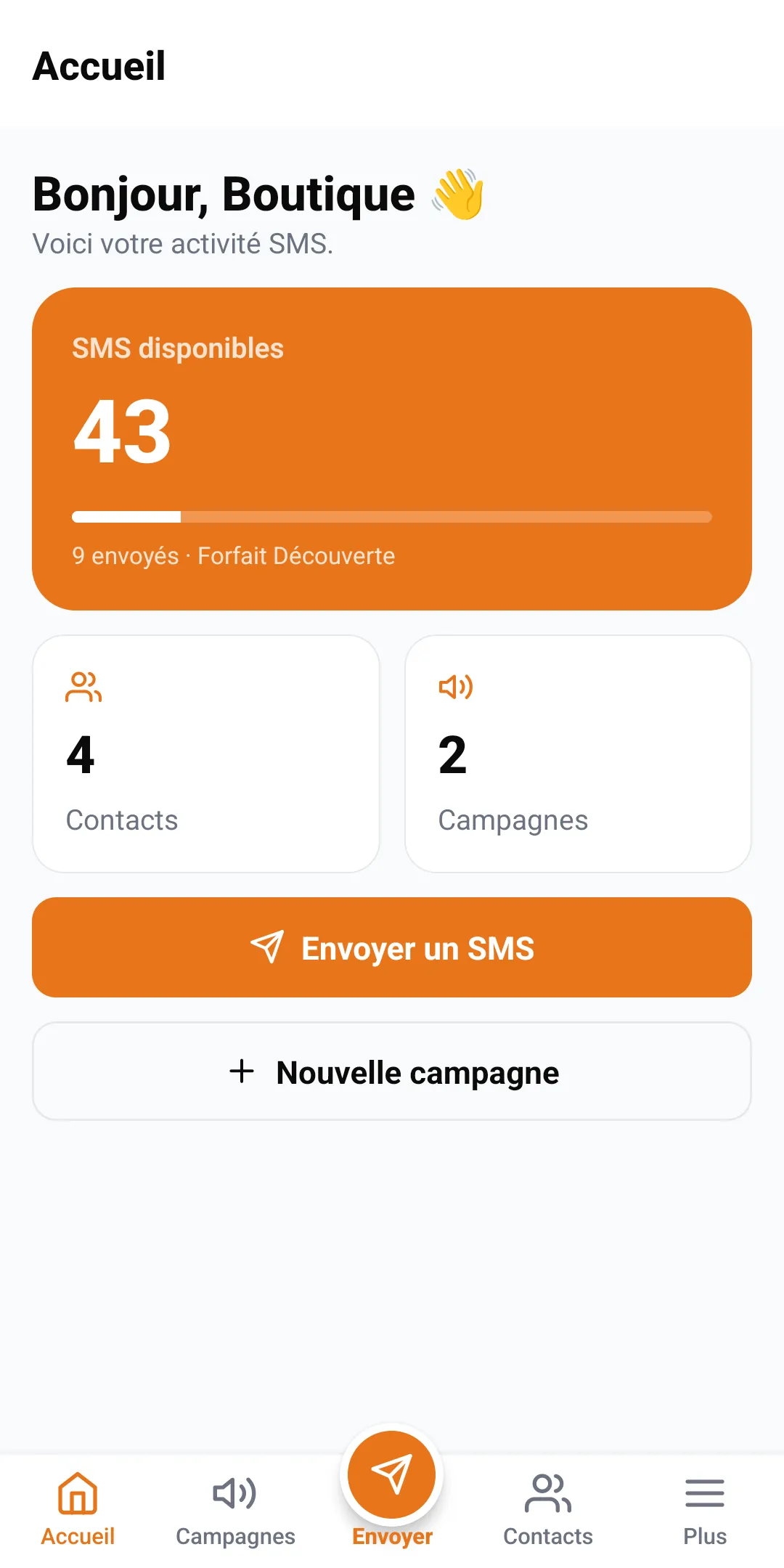
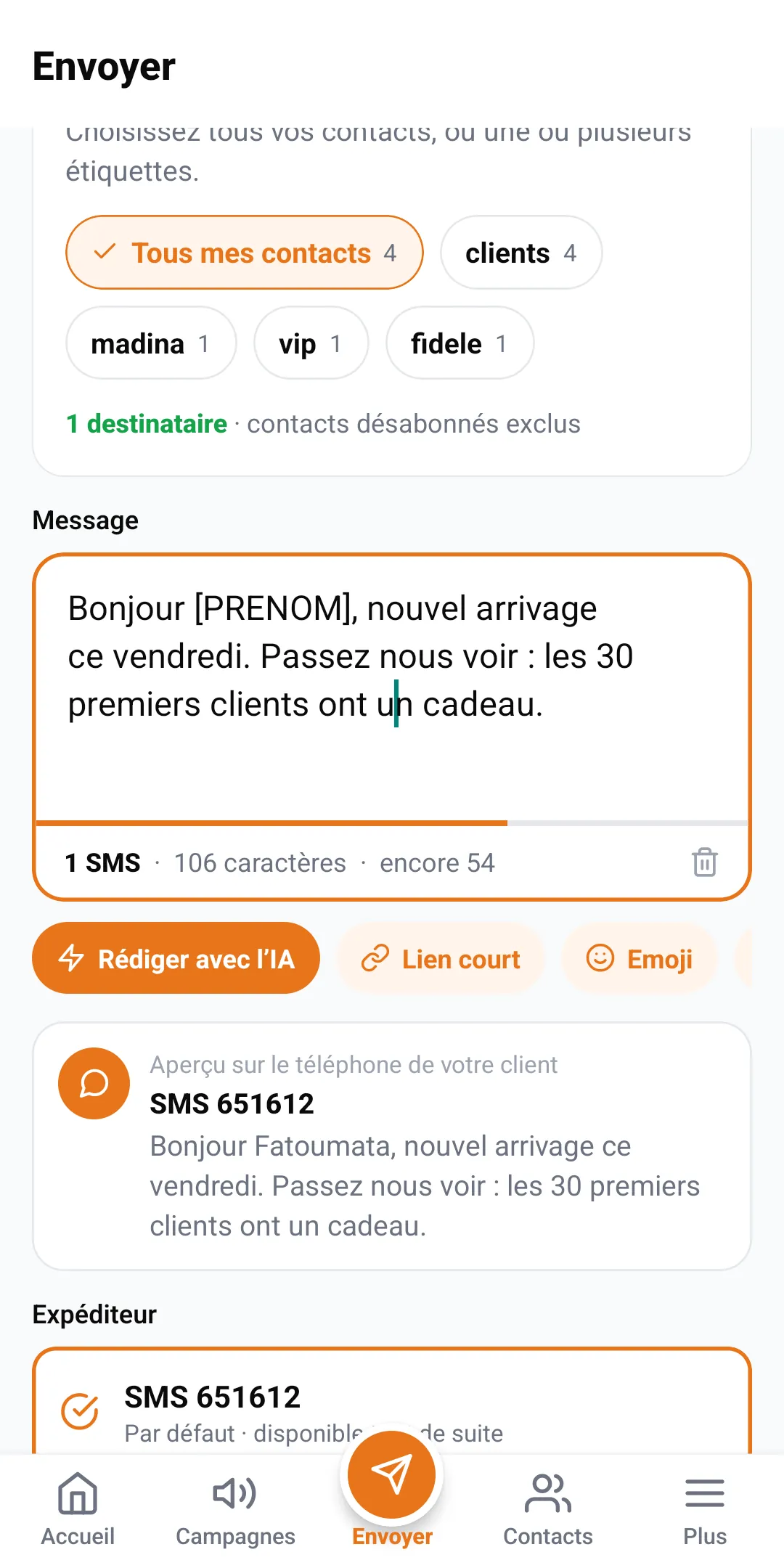
Table of Contents
- Why an app, and not just a website?
- What you lose by sending messages from your usual messaging app
- What the Sakitoo SMS app does
- A typical day, for example
- App or website: which does what
- Install and get started
- Best Practices for Mobile
- How much does it cost?
- Frequently Asked Questions
Why an app, and not just a website?
In Guinea, many small business owners rely primarily on their cell phones for work. The manager of a beverage warehouse in Matoto, a seamstress in Bambeto, a merchant in Madina who makes frequent trips to and from the port: the computer stays at the office—if there even is one. Decisions, on the other hand, are made out in the field.
Example: A container arrives earlier than expected. The merchant wants to notify his resellers right away, not in the evening when he gets home. Using the app, he opens Sakitoo SMS, selects the “resellers” tag, writes two lines, and sends it. The message arrived before he even left the port.
The app does not replace the website; it complements it for tasks that can be done quickly, right from where you are.
What you lose by sending messages from your usual messaging app
Your phone’s messaging app is designed for communicating with one person at a time. Using it for your customers comes at a cost:
- Your personal phone number is displayed. He’s on the move, his number has been saved by strangers, and he receives calls at all hours.
- No company name. The customer sees a phone number, not your brand.
- Sending limits. Sending dozens of text messages at once from a personal phone line may result in the line being blocked or slowed down.
- No customization. It’s impossible to write “Hello, Ibrahima” to everyone without typing it out.
- No results found. You don't know who received the message or who didn't.
- Your credit is deducted here. Each text message is deducted from your personal plan.
WhatsApp groups have other limitations: they don’t reach people without internet access, messages get lost in the mix, and all members can see each other’s phone numbers.
What the Sakitoo SMS app does
Send an SMS to one or more contacts
Write your message, select the recipients, and send. The counter shows how many SMS messages the message will use before it is sent. Each contact’s first name can be automatically inserted.
Import contacts from your address book
This is one of the great advantages of mobile phones: your customers are often already in your phone. The app lets you select them from your contacts and add them to your Sakitoo list, along with a label. You can build your customer database without having to re-enter any information.
Schedule a message
Prepare your message in the evening, choose the send time, and it will be sent automatically the next morning. Ideal for holiday greetings, weekend promotions, or reminders. See Schedule your SMS campaigns.
Track deliveries
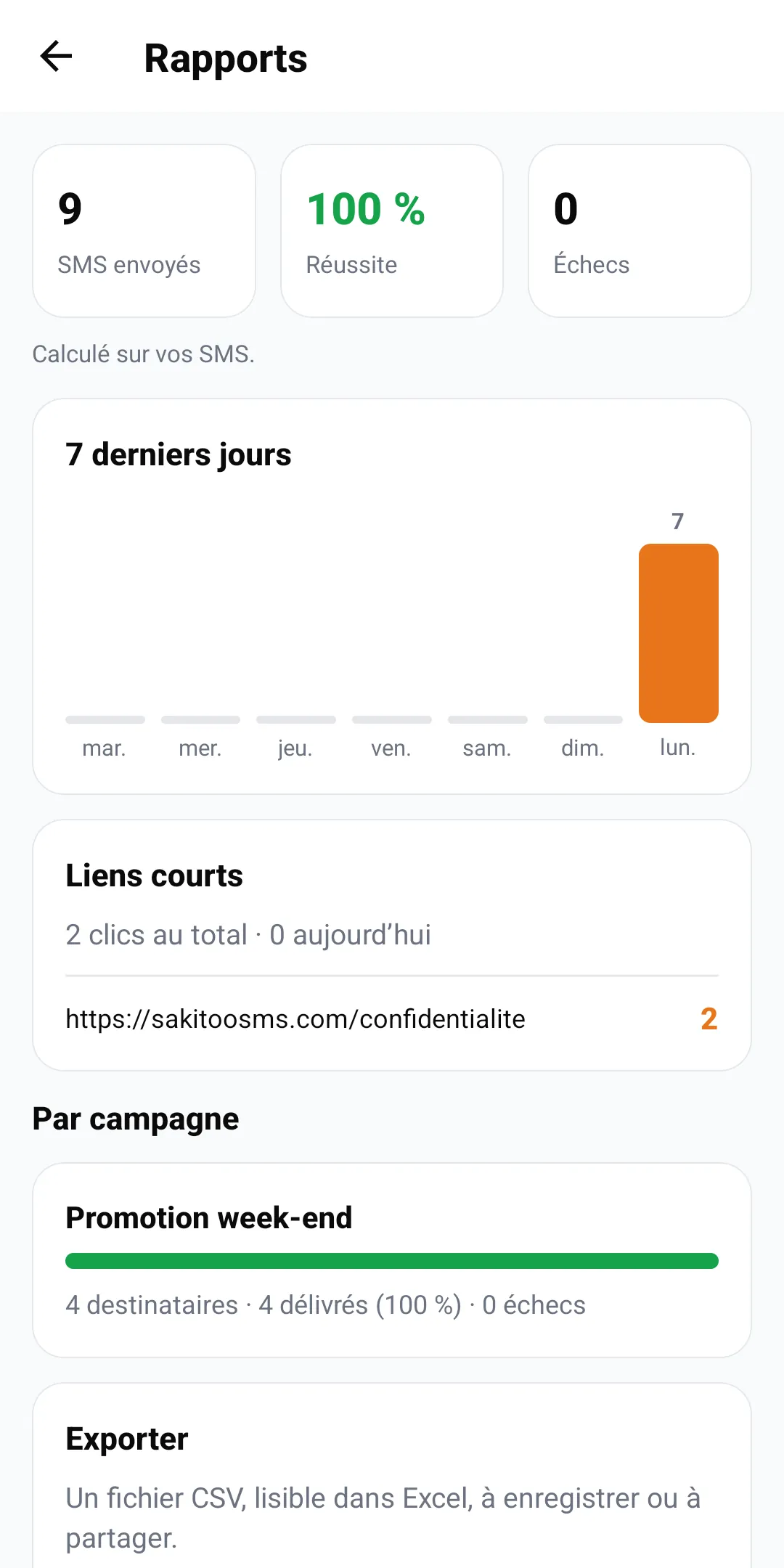
After each message is sent, check who received it, which messages are pending, and which ones failed. Numbers that failed can be corrected or removed.
Top up your balance
Top up your mobile money balance right from the app—no need to wait until you're at the office. You can check your balance at any time on the home screen.
Sign with your sender name
If your account has a Sender's name...SMS messages sent from the app also include this information.
A typical day, for example
The following example illustrates what the app can do; it is not a testimonial.
7:30 a.m., at home. Aïcha, who runs a cosmetics store in Kaloum, checks her balance in the app: 640 SMS messages remaining.
9 a.m., at the store. A new customer makes her first purchase. Aïcha adds her to her contacts and then, in the app, to the “customers” label. She’ll receive the next message.
Noon, at the market. A supplier offers her a batch of creams at a discounted price. She buys them and schedules an SMS for 9 a.m. the next day: “Hello [first name], a shipment of creams at a great price is arriving tomorrow at the Kaloum store.”
4:00 p.m., in the taxi. She reviews the report for the previous week’s campaign: three failed messages. She deletes them.
The next day, 9 a.m. The message is sent automatically to her 210 customers. Aïcha, meanwhile, opens the store.
None of this required a computer.
App or website: which does what
The app and the website share the same account: same contacts, same balance, same reports. You can switch between them without losing anything.
| Requirements | Android app | sakitoosms.com |
|---|---|---|
| Send messages quickly from the field | Ideal | Possible |
| Add contacts from the address book | Ideal | — |
| Import a large Excel file | Possible depending on the file | Ideal |
| Schedule a campaign | Yes | Yes |
| View reports | Yes | Yes, with more details |
| Set up automations and business tools | Partial | Ideal |
| Set up a website or software | — | Yes (integrations, APIs) |
For advanced settings — automations, business tools, Integrations — The site is easier to use on a larger screen.
Install and get started
1. Download the app
On your Android phone, open Google Play and search for “Sakitoo SMS.” Check the publisher’s name before installing: never install an SMS app found through an unknown link.
2. Create an account or log in
If you already have an account on the site, log in using the same credentials. Otherwise, create one from the app or at sakitoosms.com.
3. Add your first contacts
Select about ten loyal customers from your contact list and categorize them with a label.
4. Purchase your first package
The Discovery Pack (50 SMS messages) is enough for an initial test.
5. Send a test message
First, send the message to yourself, then to your ten customers. Check the delivery report.
The illustrated user guide, which applies to both the website and the app, can be found at How it works.
Best Practices for Mobile
Please review before clicking
On a small screen, mistakes are easier to miss, especially when it comes to prices and dates. Double-check the preview. A pricing error sent to 200 customers can’t be undone.
Don't leave your phone unlocked
The app gives you access to your balance and your contacts. Protect your phone with a passcode and do not let anyone else use your account.
Save the long essays for later
For a major campaign, take your time drafting the text—perhaps using the text-drafting assistant—and then schedule it. Mobile messaging is about acting quickly, not rushing through things.
Please observe the schedule
Just because you’re at the port at 11 p.m. doesn’t mean your customers want a text message at 11 p.m. Schedule it for the next morning.
Categorize each new entry
A contact added without a label is difficult to target later on. Get into the habit of labeling them right away.
How much does it cost?
The app is free to install. You only pay for the text messages you send, in bundles, using the same balance as on the website. SMS messages never expire.
| Package | SMS | Prices |
|---|---|---|
| Explore | 50 | 12,500 GNF |
| Starter | 200 | 42,000 GNF |
| Pro | 1 000 | 205,000 GNF |
| Business | 5 000 | 1,025,000 GNF |
| Business | 20 000 | based on a quote |
The sender name is free with the Pro plan (1,000 SMS) or a business plan; otherwise, your SMS messages will be sent with the default sender. SMS messages are not charged against your phone plan: the app only needs an internet connection to transmit your message request. A long message counts as multiple SMS messages.
Prices verified on 11/13/2026, see /pricing. To estimate your budget, read How much does an SMS cost in Guinea?.
Who will find this app most useful?
- Retailers and wholesalers Always on the go: new arrival announcements, promotions, loyalty programs. See Build customer loyalty through text messages.
- Artisans and service providers (tailoring, hair salons, auto repair): appointment reminders and ready orders.
- Leaders of associations or tontines : Meeting and membership fee reminders sent from your phone.
- School Principals who want to notify parents from the schoolyard without having to go to the school office.
What should I do if the message doesn't send?
On mobile devices, most issues have a simple cause. Before contacting support, check these points.
- No internet connection. The app requires an internet connection to send the message, even if your recipients don’t need one. Switch to Wi-Fi or check your mobile data usage.
- Insufficient balance. The summary shows the number of text messages required; if your balance is lower than that, the message won't be sent in full. Top up your balance, or enable automatic top-up so you don't have to worry about it.
- Incorrectly entered numbers. A number entered manually with one digit missing is flagged as invalid. Correct it in the contact's profile.
- Message too long. This isn't a glitch, but a surprise: a 300-character message counts as multiple SMS messages per recipient. The counter lets you know this before you send it.
- Outdated app. Update the app from Google Play to enjoy the latest features and bug fixes.
If the problem persists, you can contact support from the Support page in your account. Please include the time the message was sent and the number of recipients—this will help us locate the campaign quickly.
Use Cases by Industry: A Day with the App
The app comes in handy when you’re away from your desk. Here’s how people in different professions can use it throughout the day. These are examples that can be adapted to your business.
The shopkeeper from Madina
Example: At 7 a.m., before opening, the manager of a fabric store learns that a container is arriving that morning. Using his phone, he opens the app, selects the “wax customers” label, writes three lines, and schedules the message to be sent at 10 a.m., once the merchandise has been stocked. He doesn’t need to go home or turn on a computer.
The school principal is away on business
Example: A principal is in a meeting at the school inspectorate in Kaloum when he learns that a water outage means students must be dismissed at noon. He notifies all parents within two minutes, on behalf of the school, right from the hallway. Parents don’t find out the news only when they arrive to find the gate closed.
The manager of a clinic
Example: A doctor needs to cancel his afternoon appointments. The secretary is away. He selects the patients scheduled for that day and sends them an apology message with a suggested new appointment time. This way, patients don’t make the trip for nothing.
The association or tontine
Example: The treasurer of a tontine in Kindia reminds each member of the date of the next contribution—right from the market—without using up her personal text message allowance or having to send forty messages one by one.
Common mistakes when using a text messaging app
- Send messages from your personal SIM card. Your personal number is displayed, your customers call you at all hours, and each message is deducted from your plan. With the app, messages are sent from the platform and appear to come from your company.
- Please don't forget to proofread on a small screen. A message that appears short on your phone may exceed 160 characters. Check the character counter before sending: it shows how many SMS messages will be counted.
- Combine personal contacts and clients. Import only the phone numbers of people who have given you their consent, and organize them by label so you don’t accidentally send a promotional message intended for customers to your family.
- Do not verify the reports. After sending a large number of messages, open the reports: you’ll see the numbers that didn’t receive the message and can correct them.
Checklist before sending your first message from your phone
- Your account has been created and your balance has been reloaded.
- Your contacts are imported and organized by group.
- Your message fits in one SMS, or you agree that it may span two.
- You've tested it using your own number.
- Messages are sent at times that are convenient for your recipients: neither at night nor during prayer times.
Frequently Asked Questions
Where can I download it? On Google Play, search for “Sakitoo SMS.”
Does it use up my credit? No, SMS messages are deducted from your Sakitoo balance.
Do recipients need to install it? No, they receive a regular text message on all networks in Guinea: Orange, MTN, and Cellcom.
Can I use the same account on my computer and phone? Yes.
iPhone version? On an iPhone, access the site through your browser.
Your business in your pocket
Any information you save for “when I’m back at the office” arrives too late: the shipment has already been sold elsewhere, or the customer has already forgotten about it. With the Sakitoo SMS app, you can notify your customers the moment something happens, using your company’s name.
Create My Account, then install “Sakitoo SMS” from Google Play.
Frequently Asked Questions
Where can I download the Sakitoo SMS app?
On Google Play, for Android phones. Search for “Sakitoo SMS” and make sure the publisher is Sakitoo.
Does the app use my phone credit?
No. SMS messages are sent from the platform and are deducted from your Sakitoo balance, not from your mobile plan. All you need is an internet connection to send them.
Do my recipients need the app?
No. They receive a regular text message on any phone, on all networks in Guinea: Orange, MTN, and Cellcom.
Can I use the same account on both my computer and my phone?
Yes. Contacts, balance, templates, and reports are the same on the website and in the app.
Is there an iPhone version?
The app is available on Android. On iPhone, you can access the sakitoosms.com website via your browser.